paserbyp: (Default)
The computer revolution has always been driven by the new and the next. The hype-mongers have trained us to assume that the latest iteration of ideas will be the next great leap forward. Some, though, are quietly stepping off the hype train. Whereas the steady stream of new programming languages once attracted all the attention, lately it’s more common to find older languages like Ada and C reclaiming their top spots in the popular language indexes. Yes, these rankings are far from perfect, but they’re a good litmus test of the respect some senior (even ancient) programming languages still command.


It’s also not just a fad. Unlike the nostalgia-driven fashion trends that bring back granny dresses or horn-rimmed glasses, there are sound, practical reasons why an older language might be the best solution for a problem.

For one thing, rewriting old code in some shiny new language often introduces more bugs than it fixes. The logic in software doesn’t wear out or rot over time. So why toss away perfectly debugged code just so we can slurp up the latest syntactic sugar? Sure, the hipsters in their cool startups might laugh, but they’ll burn through their seed round in a few quarters, anyway. Meanwhile, the megacorps keep paying real dividends on their piles of old code. Now who’s smarter?

Sticking with older languages doesn’t mean burying our heads in the sand and refusing to adopt modern principles. Many old languages have been updated with newer versions that add modern features. They add a fresh coat of paint by letting you do things like, say, create object-oriented code.

The steady devotion of teams building new versions of old languages means developers don’t need to chase the latest trend or rewrite our code to conform to some language hipster’s fever dream. We can keep our dusty decks running, even while replacing punch-card terminals with our favorite new editors and IDEs.

Here are older languages that are still hard at work in the trenches of modern software development:

FORTRAN

Fortran dates to 1953, when IBM decided it wanted to write software in a more natural way approximating mathematical formulae instead of native machine code. It’s often called the first higher-level language. Today, Fortran remains popular in hard sciences that need to churn through lots of numerical computations like weather forecasts or simulations of fluid dynamics. More modern versions have added object-oriented extensions (2003) and submodules (2008). There are open source versions like GNU Fortran and companies like Intel continue to support their own internal version of the language.

COBOL

COBOL is the canonical example of a language that seems like it ought to be long gone, but lives on inside countless blue-chip companies. Banks, insurance companies, and similar entities rely on COBOL for much of their business logic. COBOL’s syntax dates to 1959, but there have been serious updates. COBOL-2002 delivered object-oriented extensions, and COBOL-2023 updated its handling of common database transactions. GnuCOBOL brings COBOL into the open source folds, and IDEs like Visual COBOL and isCOBOL make it easy to double-check whether you’re using COBOL’s ancient syntax correctly.

Ada

Development on Ada began in the 1970s, when the US Department of Defense set out to create one standard computer language to unify its huge collection of software projects. It was never wildly popular in the open market, but Ada continues to have a big following in the defense industries, where it controls critical systems. The language has also been updated over the years to add better support for features like object-oriented code in 1995, and contract-based programming in 2012, among others. The current standard, called Ada 2022, embraces new structures for stable, bug-free parallel operations.

Perl

Python has replaced Perl for many basic jobs, like writing system glue code. But for some coders, nothing beats the concise and powerful syntax of one of the original scripting languages. Python is just too wordy, they say. The Comprehensive Perl Archive Network (CPAN) is a huge repository of more than 220,000 modules that make handling many common programming chores a snap. In recent months, Perl has surged in the Tiobe rankings, hitting number 10 in September 2025. Of course, this number is in part based on search queries for Perl-related books and other products listed on Amazon. The language rankings use search queries as a proxy for interest in the language itself.

C, C++, etc.

While C itself might not top the list of popular programming languages, that may be because its acolytes are split between variants like plain C, C++, C#, or Objective C. And, if you’re just talking about syntax, some languages like Java are also pretty close to C. With that said, there are significant differences under the hood, and the code is generally not interoperable between C variants. But if this list is meant to honor programming languages that won’t quit, we must note the popularity of the C syntax, which sails on (and on) in so many similar forms.

Visual Basic

The first version of BASIC (Beginner’s All-purpose Symbolic Instruction Code) was designed to teach school children the magic of for loops and GOSUB (go to subroutine) commands. Microsoft understood that many businesses needed an intuitive way to inject business logic into simple applications. Business users didn’t need to write majestic apps with thousands of classes split into dozens of microservices; they just needed some simple code that would clean up data mistakes or address common use cases. Microsoft created Visual Basic to fill that niche, and today many businesses and small-scale applications continue on in the trenches. VB is still one of the simplest ways to add just a bit of intelligence to a simple application. A few loops and if-then-else statements, just like in the 1960s, but this time backed by the power of the cloud and cloud-hosted services like databases and large language models. That’s still a powerful combination, which is probably why Visual Basic still ranks on the popular language charts.

Pascal

Created by Niklaus Wirth as a teaching language in 1971, Pascal went on to become one of the first great typed languages. But only specific implementations really won over the world. Some old programmers still get teary-eyed when they think about the speed of Turbo Pascal while waiting for some endless React build cycle to finish. Pascal lives on today in many forms, both open source and proprietary. The most prominent version may be Delphi’s compiler, which can target all the major platforms. The impatient among us will love the fact that this old language still comes with the original advertising copy promising that Delphi can “Build apps 5x faster.”

Python

Python is one of the newest languages in this list, with its first public release in 1991. But many die-hard Python developers are forced to maintain older versions of the language. Each new version introduces just enough breaking changes to cause old Python code to fail in some way if you try to run it with the new version. It’s common for developers to set up virtual environments, used to lock-in ancient versions of Python and common libraries. Some of my machines have three or four venvs—like time capsules that let me revisit the time before Covid, or Barack Obama, or even the Y2K bug craze. While Python is relatively young compared to the other languages on this list, the same spirit of devotion to the past lives on in the hearts and minds of Python developers tirelessly supporting old code.
paserbyp: (Default)
For decades, programming has meant writing code. Crafting lines of cryptic script written by human hands to make machines do our bidding. From the earliest punch cards to today's most advanced programming languages, coding has always been about control. Precision. Mastery. Elegance. Art.

But now we're seeing a shift that feels different. AI can write code, explain it, refactor, optimize, test, and even design systems. Tools like GitHub Copilot and GPT-4 have taken what was once a deeply manual craft requiring years of hard-fought experience and made it feel like magic.

So, the question on everyone's mind:

Is AI the end of programming as we know it?

The short answer is yes, but not in the way you might think.

To understand where we're going, we must look at where we've been as an industry.

Early computing didn't involve keyboards or screens. Programmers used punch cards, literal holes in paper, to feed instructions into machines. It was mechanical, slow, and very fragile. A single misplaced hole could break everything, not to mention a bug crawling into the machine.

Then came assembly language, a slightly more human-readable way to talk to the processor. You could use mnemonic codes like MOV, ADD, and JMP instead of binary or hexadecimal. It was faster and slightly easier, but it still required thinking like the machine.

High-level compiled languages like C marked a major turning point. Now we could express logic more naturally, and compilers would translate it into efficient machine instructions. We stopped caring about registers and memory addresses and started solving higher-level problems.

Then came languages like Python, Java, and JavaScript. Tools designed for developer productivity. They hid memory management, offered rich libraries, and prioritized readability. Each layer of abstraction brought us closer to the way humans think and further from the machine.

Every step was met with resistance.

"Real programmers write in assembly."

"Give me C or give me death!"

"Python? That's not a language, it's a cult!"

And yet, every step forward allowed us to solve more complex problems in less time.

Now, we're staring at the next leap: natural language programming.

AI doesn't give us a new language. It gives us a new interface. A natural, human interface that opens programming to the masses.

You describe what you want, and it builds the foundation for you.

You can ask it to "write a function to calculate the temperature delta between two sensors and log it to the cloud," and it does. Nearly instantly.

This isn't automation of syntax. It's automation of thought patterns that used to require years of training to master.

Of course, AI doesn't get everything right. It hallucinates. It makes rookie mistakes. But so did early compilers. So did early human programmers. So do entry-level and seasoned professional engineers.

The point is simple. You are no longer required to think like a machine.

You can think like a human and let AI translate.

AI is not the end of programming. It's the latest and most powerful abstraction layer in the history of computing!

So why do so many developers feel uneasy?

Because coding has been our identity. It's a craft, a puzzle, a superpower. It's what we love to do! Perhaps for some, even what we feel we were put on this Earth to do. The idea that an AI can do 80% of it feels like a threat. If we're not writing code, what are we doing?

Thankfully, this isn't the first time we've faced this question.

Assembly programmers once scoffed at C. C programmers once mocked C++, Python, and Rust. Each generation mourns the tools of the past as if they were sacred.

Here's the uncomfortable truth: We don't miss writing assembly, managing our own memory in C, or boilerplate code.

What about API glue? Or scaffolding? Low-level drivers? We won't miss it one bit in the future!

Sure, you may long for the "old days," but sit down for an hour, and you'll quickly thank God for the progress we've made.

Progress in software has always been about solving bigger problems with less effort. The march to adopt AI is no different.

For the last 50+ years, we've been stuck translating human vision into something that machines can understand. Finally, we are at the point where we can talk to a machine like it's a human and let it tell the machine what we want.

As programming evolves, so do the skills that matter.

In the world of AI-assisted development, the most valuable skill isn't syntax or algorithms, it's clarity.

Can you express what you want?

Can you describe edge cases, constraints, and goals?

Can you structure your thinking so that an AI, or another human, can act on?

Programming is becoming a conversation, not a construction.

Debugging becomes dialogue.

System design becomes storytelling.

Architecture becomes strategic planning, done in collaboration with AI and your team to align vision and execution.

In other words, we're shifting from "how well can you code" to "how well can you communicate?"

This doesn't make programming less technical. It makes it more human.

It forces us to build shared understanding, not just between people and machines, but between people and each other.

So, is AI the end of programming as we know it?

Absolutely.

Syntax, editors, or boilerplate code no longer bind us.

We are stepping into a world where programming means describing, collaborating, and designing.

That means clearer thinking. Better communication. Deeper systems understanding. And yes, letting go of some of the craftsmanship we once prized.

But that's not a loss.

It's liberation.

We don't need punch cards to feel like real developers.

We don't need to write assembly to prove our value.

And in the future, we won't need to write much code to build something amazing.

Instead, we'll need to think clearly, communicate effectively, and collaborate intelligently.

And that, perhaps, is the most human kind of programming there is.
paserbyp: (Default)
On stage at Microsoft’s 50th anniversary celebration in Redmond earlier this month, CEO Satya Nadella showed a video of himself retracing the code of the company’s first-ever product, with help from AI.
“You know intelligence has been commoditized when CEOs can start vibe coding,” he told the hundreds of employees in attendance.

The comment was a sign of how much this term—and the act and mindset it aptly describes—have taken root in the tech world. Over the past few months, the normally exacting art of coding has seen a profusion of ✨vibes✨ thanks to AI.

The meme started with a post from former Tesla Senior Director of AI Andrej Karpathy in February. Karpathy described it as an approach to coding “where you fully give in to the vibes, embrace exponentials, and forget that the code even exists.”

The concept gained traction because it touched on a transformation—a vibe shift?—that was already underway among some programmers, according to Amjad Masad, founder and CEO of AI app development platform Replit. As LLM-powered tools like Cursor, Replit, and Windsurf—which is reportedly in talks to be acquired by OpenAI—have gotten smarter, AI has made it easier to just…sort of…wing it.

“Coding has been seen as this—as hard a science as you can get. It’s very concrete, mathematical structure, and needs to be very precise,” Masad told Tech Brew. “What is the opposite of precision? It is vibes, and so it is communicating to the public that coding is no longer about precision. It’s more about vibes, ideas, and so on.”

The rise of automated programming could transform the field of software development. Companies are already increasingly turning to AI platforms to expedite coding work, data from spend management platform Ramp shows. While experts say coding skills are needed to debug and understand context while vibe coding, AI will likely continue to bring down the barrier to entry for creating software.

Coding has long been one of the most intuitive use cases for LLMs. OpenAI first introduced Codex, its AI programming tool based on GPT-3, more than a year before the debut of ChatGPT in 2022. Companies of all kinds often tell us that code development work is one of the first places they attempt to apply generative AI internally.

But the act of vibe coding describes a process beyond simple programming assistance, according to Karpathy’s original post. It’s an attitude of blowing through error messages and directing the AI to perform simple tasks rather than doing it oneself—and trusting that the AI will sort it all out in the end.

“It’s not really coding—I just see stuff, say stuff, run stuff, and copy-paste stuff, and it mostly works,” he wrote.

Masad said he builds personal apps like health tracking tools and data dashboards at work with Replit, which is one of the less coding-heavy of these platforms. Sometimes, he will attempt to spin up a substitute tool if he doesn’t want to pay for an enterprise software subscription. He recently used the platform to make a YouTube video downloader because he was sick of ads on existing websites.

Srini Iragavarapu, director of generative AI applications and developer experiences at Amazon Web Services, told us that coding tools like Amazon Q Developer have helped his software developer team more easily switch between coding languages they were previously unfamiliar with. AI is not fully automating coding works, he said, but allowing developers to get up to speed on new tasks more easily.

“The time to entry, and even to ramp up to newer things, is what is getting reduced drastically because of this,” Iragavarapu said. “[It] means now you’re chugging out features for customers a lot faster to solve their own sets of problems as well.”

Data from corporate spend management platform Ramp showed that business spending on AI coding platforms like Cursor, Lovable, and Codeium (now Windsurf) grew at a faster clip in the first months of this year than model companies more broadly. Ramp economist Ara Kharazian said this difference was significant despite the comparison being between smaller companies and more established ones.

“The kind of month-over-month growth that we’re seeing right now is still pretty rare,” Kharazian said. “If the instinct is to think that vibe coding is something that’s caught on in the amateur community or by independent software engineers just making fun tools…we’re also seeing this level of adoption in high-growth software companies, everything from startups to enterprise, adoption across sectors, certainly concentrated in the tech sector, but by fairly large companies that are spending very large amounts of money onboarding many of their users and software engineers onto these tools.”

Not everyone agrees that vibe coding is quite ready to transform the industry. Peter Wang, chief AI and innovation officer and co-founder of data science and AI distribution platform Anaconda, said it’s currently more useful for senior developers who know the specific prompts to create what they need, and how to assemble and test those pieces.

“It’s definitely the beginning of something interesting, but in its current form, it’s quite limited,” Wang said. “It’s sort of like if someone who’s already an industrial designer goes and 3D prints all the parts of a car, versus someone who’s not an industrial designer trying to 3D print a whole car from scratch. One’s going to go way better than the other.”

Wang said he thinks that vibe coding will really start to come into its own when it can yield modular parts of software that even an amateur coder might easily assemble into whatever program they need.

“What I’m looking for is the emergence of something like a new approach to programs that makes little modular pieces that can be assembled more robustly by the vibe coding approach,” Wang said. “We don’t really have that Easy Bake thing yet. Right now, it’s like, ‘Here’s the recipe. Go cook the entire meal for me.’...I think if we can actually get to that point, then it’ll unlock a world of possibilities.”
paserbyp: (Default)
My good old friend and colleague Mike who in the late 2000s built an application for his colleagues that he described as a "content migration toolset." The app was so good that customers started asking for it and Mike's employer decided to commercialize it.

To make that happen, Mike realized his employer would need a licensing system to check that every instance of the app had been paid for.

So he wrote one.

"Excited by the challenge, I spent a weekend researching asymmetric keys and built a licensing system that periodically checked in with the server, both on startup and at regular intervals," he told Me.

The licensing server worked well. Mike told Me that fixing its occasional glitches didn't occupy much of his time.

Requests for new features required more intensive activity, and on one occasion Mike couldn't finish coding within office hours.

"Normally, I left my laptop at the office, but to make progress on the new feature I took it home for the weekend," he told Me.

Mike thought he made fine progress over the weekend, but on Monday, his phone lit up – the licensing app was down, and nobody could log into the content migration toolset.

Customers were mad. Bosses were confused. Mike was in the spotlight.

"Instantly, I glanced down at the footwell of my car, where my laptop bag sat," Sam told Me "And that's when it hit me: the licensing server was still running on my laptop."

It was running there because, as he realized, "I had never transferred it to a production server. For years, it had been quietly running on my laptop, happily doing its job."

Suffice to say that when Mike arrived in the office, his first job was deploying the licensing app onto a proper server!
paserbyp: (Default)
Every three days Nathan, a 27-year-old venture capitalist in San Francisco, ingests 15 micrograms of lysergic acid diethylamide (commonly known as lsd or acid). The microdose of the psychedelic drug – which generally requires at least 100 micrograms to cause a high – gives him the gentlest of buzzes. It makes him feel far more productive, he says, but nobody else in the office knows that he is doing it. “I view it as my little treat. My secret vitamin,” he says. “It’s like taking spinach and you’re Popeye.”
Nathan first started microdosing in 2014, when he was working for a startup in Silicon Valley. He would cut up a tab of lsd into small slices and place one of these on his tongue each time he dropped. His job involved pitching to investors. “So much of fundraising is storytelling, being persuasive, having enough conviction. Microdosing is pretty fantastic for being a volume knob for that, for amplifying that.” He partly credits the angel investment he secured during this period to his successful experiment in self-medication.

Of all the drugs available, psychedelics have long been considered among the most powerful and dangerous. When Richard Nixon launched the “war on drugs” in the 1970s, the authorities claimed lsd caused people to jump out of windows and fried users’ brains. When Ronald Reagan was the governor of California, which in 1966 was one of the first states to criminalise the drug, he argued that “anyone that would engage or indulge in [lsd] is just a plain fool”.

Yet attitudes towards psychedelics appear to be changing. According to a 2013 paper from two Norwegian researchers that used data from 2010, Americans aged between 30 and 34 – not the original flower children but the next generation – were the most likely to have tried lsd. An ongoing survey of middle-school and high-school students shows that drug use has fallen across the board among the young (as in most of the rich world). Yet, lsd use has recently risen a little, and the perceived risks of the drug fallen, among 13- to 17-year-olds.

As with many social changes, from transportation to food delivery to dating, Silicon Valley has blazed a trail with microdosing. It may yet influence the way that America, and eventually the West, view psychedelic substances.

Lsd’s effects were discovered by accident. In April 1943 Albert Hoffmann, a Swiss scientist, mistakenly ingested a small amount of the chemical, which he had synthesised a few years earlier though never tested. Three days later he took 250 micrograms of the drug on purpose and had a thoroughly bad trip, but woke up the next day with a “sensation of well-being and renewed life”. Over the next decade, lsd was used recreationally by a select group of people, such as the writer Aldous Huxley. But not until it was mass produced in San Francisco in the 1960s did it fill the sails of the hippy movement and inspire the catchphrase “turn on, tune in and drop out”.

From the start, a small but significant crossover existed between those who were experimenting with drugs and the burgeoning tech community in San Francisco. “There were a group of engineers who believed there was a causal connection between creativity and lsd,” recalls John Markoff, whose 2005 book, “What the Dormouse Said”, traces the development of the personal-computer industry through 1960s counterculture. At one research centre in Menlo Park over 350 people – particularly scientists, engineers and architects – took part in experiments with psychedelics to see how the drugs affected their work. Tim Scully, a mathematician who, with the chemist Nick Sand, produced 3.6m tabs of lsd in the 1960s, worked at a computer company after being released from his ten-year prison sentence for supplying drugs. “Working in tech, it was more of a plus than a minus that I worked with lsd,” he says. No one would turn up to work stoned or high but “people in technology, a lot of them, understood that psychedelics are an extremely good way of teaching you how to think outside the box.”

San Francisco appears to be at the epicentre of the new trend, just as it was during the original craze five decades ago. Tim Ferriss, an angel investor and author, claimed in 2015 in an interview with cnn that “the billionaires I know, almost without exception, use hallucinogens on a regular basis.” Few billionaires are as open about their usage as Ferriss suggests. Steve Jobs was an exception: he spoke frequently about how “taking lsd was a profound experience, one of the most important things in my life”. In Walter Isaacson’s 2011 biography, the Apple ceo is quoted as joking that Microsoft would be a more original company if Bill Gates, its founder, had experienced psychedelics.

As Silicon Valley is a place full of people whose most fervent desire is to be Steve Jobs, individuals are gradually opening up about their usage – or talking about trying lsd for the first time. According to Chris Kantrowitz, the ceo of Gobbler, a cloud-storage company, and the head of a new fund investing in psychedelic research, people were refusing to talk about psychedelics as recently as three years ago. “It was very hush hush, even if they did it.” Now, in some circles, it seems hard to find someone who has never tried it.

Lsd works by interacting with serotonin, the chemical in the brain that modulates mood, dreaming and consciousness. Once the drug enters the brain (no mean feat), it hijacks the serotonin 2a receptor, explains Robin Carhart-Harris, a scientist at Imperial College London who is among those mapping out the effects of psychedelics using brain-scanning technology. The 2a receptor is most heavily expressed in the cortex, the part of the brain in which consciousness could be said to reside. One of the first effects of psychedelics such as lsd is to “dissolve a sense of self,” says Carhart-Harris. This is why those who have taken the drug sometimes describe the experience as mystical or spiritual.

The drug also seems to connect previously isolated parts of the brain. Scans from Carhart-Harris’s research, conducted with the Beckley Foundation in Oxford, show a riot of colour in the volunteers’ brains, compared with those who have taken a placebo. The volunteers who had taken lsd did not just process those images they had actually seen in their visual cortexes; instead many other parts of the brain started processing visions, as though the subject was seeing things with their eyes shut. “The brain becomes more globally interconnected,” says Carhart-Harris. The drug, by acting on the serotonin receptor, seems to increase the excitability of the cortex; the result is that the brain becomes far “more open”.

In an intensely competitive culture such as Silicon Valley, where everyone is striving to be as creative as possible, the ability for lsd to open up minds is particularly attractive. People are looking to “body hack”, says Kantrowitz: “How do we become better humans, how do we change the world?” One ceo of a small startup describes how, on an away-day with his company, everyone took magic mushrooms. It allowed them to “drop the barriers that would typically exist in an office”, have “heart to hearts”, and helped build the “culture” of the company. (He denied himself the pleasure of partaking so that he could make sure everyone else had a good time.) Eric Weinstein, the managing director of Thiel Capital, told Rolling Stone magazine last year that he wants to try and get as many people to talk openly about how they “directed their own intellectual evolution with the use of psychedelics as self-hacking tools”.

Young developers and engineers, most of them male, seem to be particularly keen on his form of bio-hacking. Alex (also not his real name), a 27-year-old data scientist who takes acid four or five times a year, feels psychedelics give him a “wider perspective” on his life. Drugs are a way to take a break, he says, particularly in a culture where people are “super hyper focused” on their work. A typical pursuit among many millennial workers, along with going to drug-fuelled music festivals or the annual Burning Man festival in the Nevada desert, is for a group of friends to rent a place in the countryside, take lsd or magic mushrooms and go for a hike (some call it a “hike-a-delic”). “I would be much more wary of telling co-workers I had done coke the night before than saying I had done acid on the weekend,” says Mike (yet another pseudonym), a 25-year-old researcher at the University of California in San Francisco, who also takes lsd regularly. It is seen as something “worthwhile, wholesome, like yoga or wholegrain”.

The quest for spiritual enlightenment – as with much else in San Francisco – is fuelled by the desire to increase productivity. Microdosing is one such product of this calculus. Interest in the topic first started to take off around 2011, when Jim Fadiman, a psychologist who took part in the experiments in Menlo Park in the 1960s, published a book on psychedelics and launched a website on the topic. “Microdosing is popular among the technologically aware, physically healthy set,” says Fadiman. “Because they are interested in science, nutrition and their own brain chemistry.” Microdoses, he claims, can also decrease social awkwardness. “I meet a lot of these people. They are not the most adept social class in the world.” Paul Austin has also written a book on microdosing and lectures on the subject across Europe and America. Many of the people he speaks to are engineers, business owners, writers and “digital nomads” looking for ways to outrun automation in the “new economy”. Drugs that “make you think differently” are one route to survival, he says.

Although data on the number of people microdosing are non-existent, since drug surveys do not ask about it, a group on Reddit now has 16,000 members, up from a couple of thousand a year ago. People post about their experiences, and most of them follow Fadiman’s suggestion of taking up to ten micrograms every three days or so. “My math is slightly better, I swear. Or maybe it’s just my confidence, either way, I am more aware, creative and have amazing ideas,” says one user, answering an inquiry about whether there is correlation between intelligence and microdosing. “I feel less adhd, greater focus,” says another user. He can identify “no bad habits [except] maybe I speak my mind more and offend people because I am very smart and often put people down with condescending remarks by accident.”

Microdosing is the logical conclusion of several trends, thinks Rick Doblin, the founder of the Multidisciplinary Association for Psychedelic Studies, a research and lobby group. For a start, many of those who took acid in the 1960s are still around, having turned into well-preserved baby-boomers. “Now, at the end of their lives, they can say that these drugs were valuable. They are not all on a commune, growing soybeans, dropping out,” he says.

Another reason for the trend is that, although there have been no scientific studies on microdosing, research on psychedelics has suggested that they may, in certain settings, have therapeutic uses. The increasing use of marijuana for medical use, and its legalisation in many states, has also led to people looking at drugs more favourably. “There’s no longer this intense fervour about drugs being dreadful,” says Doblin. Last year a study of 51 terminally ill cancer patients carried out by scientists at Johns Hopkins University appeared to suggest that a single, large dose of psilocybin – another psychedelic and the active ingredient in magic mushrooms – reduced anxiety and depression in most participants. This helps encourage those who may normally be wary of taking drugs to experiment with them, or to take them in lower, less terrifying doses. Ayelet Waldman, a writer who microdosed for a month on lsd and wrote a book documenting her experiences, makes much of the fact she is a mother, a professional and used to work with drug offenders. She is not your typical felon. (Indeed, she gave up the drug after that month, in order to stop breaking the law. But “there is no doubt in my mind that if it were legal I would be doing it,” she says.)

The availability of legal substitutes for lsd in certain parts of the world has also made microdosing far easier. Erica Avey, who works for Clue, a Berlin-based app which tracks women’s menstrual cycles, started microdosing in April with 1p-lsd, a related drug, which is still legal in Germany. Although she took it to balance her moods, she quickly found that it also helped her with her work. It made her “sharper, more aware of what my body needs and what I need,” she says. She now gets to work earlier in the morning, at 8am, when she is most productive, and leaves in the afternoon when she has a slump in energy. “At work I am more socially present. You are not really caught up in the past and the future. For meetings it’s great,” she enthuses.

Lsd is not thought to be addictive. Although people who use it regularly build up a tolerance, there is not the same “reward” that users of heroin and alcohol, two deeply addictive drugs, seek through increasing their dosages. “They are not moreish drugs,” says Carhart-Harris. The buzz of psychedelics is more abstract than other drugs, such as cocaine, which tend to make people feel good about themselves. Those who have good experiences with hallucinogens report an enhanced connection to the world (they take up veganism; they feel more warmly towards their families). Most people who microdose insist that, although they make a habit of taking it, they do not feel dependent. “With coffee you need a cup to feel normal,” says Avey. “I would never need lsd to feel normal.” She may quit later this year, having reaped enough beneficial effects. Many talk of a sense in which the dose, even though it is almost imperceptibly small, seems to stay with them. Often they feel best on the second or third day after ingestion. “I’ve definitely experienced the same levels of creativity without taking it...you retain it,” says Nathan.

The effects of microdosing depend on the environment and the work one is doing. It will not automatically improve matters. Since moving to an office with less natural light, Nathan has not found lsd as effective, although he still takes it every three days or so. Similarly, Avey doubts it would be as useful if she did not have a job she liked and a “cool work environment” (with an in-house therapist and yoga classes). Carhart-Harris raises the potential issue of “containment”. Whereas beneficial effects of psychedelics can be seen in thera­peutic environments, the spaces in which people microdose are much more diverse. A crowded subway car or an irritating meeting can become more unbearable; not every effect will be a positive one.

Currently the lack of medical research on microdosing means that it has been touted as a panacea for everything from depression and menstrual pain to migraines and impotence. The only problem that people do not try to solve through microdosing is anxiety. Since these drugs tend to heighten people’s perceptions, they are likely to exacerbate anxiety. Without more research, it is hard to know whether such a small amount of a psychedelic works merely as a placebo, and whether there are any long-term detrimental consequences, such as addiction.

There is still an understandable fear of lsd, and it is unlikely to migrate from Silicon Valley to America’s more conservative regions anytime soon. But in a country which is awash with drugs, microdosing with an illicit substance may not seem so outlandish, particularly among the middle-classes. Already many Americans are happy to medicalise productivity. In 2011 3.5m children were prescribed drugs to treat attention disorders, up from 2.5m in 2003, and these drugs are widely used off prescription to enhance performance at work. By one estimate, 12% of the population takes an antidepressant. Americans also try to eliminate pain, mental or otherwise, by other means; the opioid epidemic has partly been caused by massive over-prescription of painkillers. Compared with these, lsd – which is almost impossible to overdose on – may no longer seem so threatening. It may help people tune in, but it no longer has the reputation of making them drop out.
paserbyp: (Default)
Containers seem to be the default approach for most systems migrating to the cloud or being built there, and for good reasons. They provide portability and scalability (using Kubernetes orchestration) that is more difficult to achieve with other enabling technology. Moreover, there is a healthy ecosystem around containers, and a solution is easier to define.

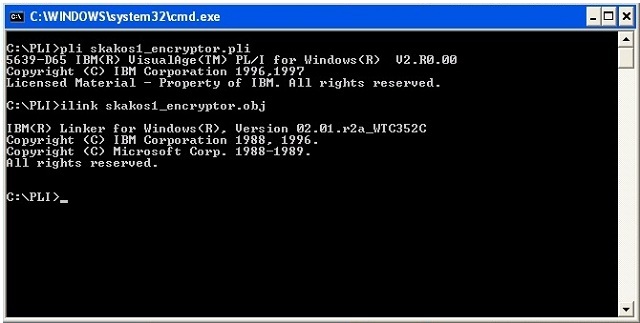
However, much like other hyped technologies these days, such as AI, serverless, etc., we’re seeing many instances where containers are misapplied. Companies are choosing containers when other enabling technologies would be better, more cost-efficient solutions.

The core downside of containers today is the overapplication of container development and the migration of existing applications to containers in “application modernization” projects. It’s not that containers don’t work—of course they do. But many things “work” that are hugely inefficient compared to other technologies.

Most companies are chasing the benefit of portability for a workload that is unlikely to ever move from its target host platform. Also, and most importantly, they do not understand that to truly take advantage of what containers offer requires a complete re-architecture of the application in most instances, which they typically didn’t do.

Net-new development has this problem as well. Enterprises are spending as much as four times the money to build the same application using container-based development and deployment versus more traditional methods. Also at issue, the container-based application could cost more to operate by using more cloud-based resources, such as storage and compute. It also costs more to secure and more to govern.

When evaluating containers, here are a few core points to consider:

* Focus on returning value back to the business. It’s the old story of developers and engineers who don’t look out for the business as much as they should. Don’t follow the hype.

* Don’t overstate benefits, such as portability, that may never be used.If it costs twice or even four times the money to get there, what are the chances you’ll ever move an application?

* Understand operational costs. Containers may cost more to operate in the long term. I’m not saying don't ever use containers, but understand the true cost of maintaining them over the years.

* Use architectural best practices. Applications often need to be redesigned for containers to be effective. “Wrapping” something doesn’t give you efficiency by default.

This is a cautionary tale to point out the need for a healthy skepticism about any technology.
paserbyp: (Default)

Devops emerged hand-in-hand with the rise of agile methodologies and cloud computing in the late 2000s, as software started to eat the world. A neat portmanteau of “development” and “operations,” devops sought to bring together the two previously separate groups responsible for building and deploying software. It also coincided with, or even inadvertently pushed forward, the need for software engineers to tighten their user feedback loops and push updates to production more frequently.

While many organizations grabbed this opportunity to bring together two sets of specialists to solve common problems at previously impossible speeds, others took the rise of devops as license for developers to take responsibility for operations tasks and sought to build a super team of semi-mythical full-stack developers.

“Devs don’t want to deal with operational concerns, for the most part,” tweeted Devops for Dummies author and head of community engagement at Amazon Web Services, Emily Freeman.

Freeman clearly hit a nerve, with hundreds of replies pouring in from developers who also did not want to do ops.

“I am a dev and I don’t want to deal with operation concerns,” Scott Pantall, a software engineer at the fast food company Chipotle, replied.

“Devs and ops should work closely while having differentiated roles. The empathy between teams is the real point,” Andrew Gracey, a developer evangelist at SUSE, weighed in.

While the concept of shifting more operational and security concerns “left” and into the domain of software developers clearly has its merits, it also has the potential to create a dangerous bottleneck.

“If you pull devs into too many different areas you end up shooting yourself in the foot. They are different skillsets,” James Brown, head of product for Kubernetes storage specialist Ondat or as Nick Durkin, field CTO at Harness, put it, “People are beginning to realize we wouldn’t hire an electrician to do our plumbing.”

While the stock of enterprise software developers has never been higher, the specialized expertise of technical operations has somewhat faded into the background, even as their workloads have increased.

As devops engineer and former systems administrator Mathew Duggan wrote last year, while operators “still had all the responsibilities we had before, ensuring the application was available, monitored, secure, and compliant,” they have also been tasked with building and maintaining software delivery pipelines, “laying the groundwork for empowering development to get code out quickly and safely without us being involved.”

These expanding responsibilities involved a mass retraining effort, where cloud engineering and infrastructure as code skills became paramount.

“In my opinion the situation has never been more bleak,” Duggan wrote. “Development has been completely overwhelmed with a massive increase in the scope of their responsibilities (RIP QA) but also with unrealistic expectations by management as to speed.”

That pressure may be starting to tell.

“It’s incredibly challenging to build an organization that achieves this level of iterative harmony that lasts for a sustainable period,” wrote Tyler Jewell, managing director at Dell Technologies Capital in a research note. “As systems grow in complexity and the end user feedback increases, it becomes increasingly difficult for a human to reason about the impact a change might have on the system.”

The situation may not be as hopeless as Duggan and others believe, though it may require a significant realignment of engineering teams and their responsibilities.

“The intention is not to put the burden on the developer, it is to empower developers with the right information at the right time,” Harness’s Durkin said. “They don’t want to configure everything, but they do want the information from those systems at the right time to allow operations and security and infrastructure teams to work appropriately. Devs shouldn’t care unless something breaks.”

Nigel Simpson, ex-director of enterprise technology strategy at the Walt Disney Company, wants to see companies “recognize this problem and to work to get developers out of the business of worrying about how the machinery works—and back to building software, which is what they’re best at.”

It’s important to remember that devops is a continuum and its implementation will vary from organization to organization. Just because developers can do some ops now doesn’t mean they always should.

“Developer control over infrastructure isn’t an all-or-nothing proposition,” Gartner analyst Lydia Leong wrote. “Responsibility can be divided across the application lifecycle, so that you can get benefits from ‘you build it, you run it’ without necessarily parachuting your developers into an untamed and unknown wilderness and wishing them luck in surviving because it’s ‘not an infrastructure and operations team problem’ anymore.”

In other words, “It’s perfectly okay to allow your developers full self-service access to development and testing environments, and the ability to build infrastructure as code templates for production, without making them fully responsible for production,” Leong wrote.

As Brown at Ondat sees it, container orchestration with Kubernetes is emerging as the layer between these two teams, separating concerns so that developers can focus on their code, and operations can ensure that the underlying infrastructure and pipelines are optimized to run it. “Let’s not rewind to those teams not speaking to one another,” Brown said.

In fact, according to VMware’s “State of Kubernetes in 2022” report, 54% of the 776 respondents said that better developer efficiency was a key reason for adopting Kubernetes, and more than a third (37%) said they want to improve operator efficiency.

“Don’t fall for the fallacy of trying to make everybody an expert,” Kaspar von Grunberg, founder of Humanitec, wrote in his email newsletter. “In high-performing teams, there are few high-profile experts on Kubernetes, and there is a high level of abstraction to keep the cognitive load low for everyone else.”

If the era of devops is indeed coming to an end, or even if the gloss is just starting to come off, what comes next?

Site reliability engineering (SRE), which emerged out of Google when it suffered its own devops-related growing pains, has proved a popular solution.

“Fundamentally, it’s what happens when you ask a software engineer to design an operations function,” Ben Treynor, vice president of engineering at Google and the godfather of SRE, is often quoted as saying.

Take the two large financial institutions, Vanguard and Morgan Stanley, which have found it difficult to balance dev and ops responsibilities as they transition towards more cloud-native practices.

Inserting an SRE safety blanket at both the central operations level and within individual developer teams has helped both companies build confidence that they are striking the right balance between developer velocity and operational stability.

However, the SRE function has also drawn some criticism. Establishing SRE principles is “sometimes misunderstood as a rebranding of the ops team,” as Trevor Brosnan, head of devops and enterprise technology architecture at Morgan Stanley, observed.

“It’s a nuanced problem to solve,” Christina Yakomin, a site reliability engineer at Vanguard, said. “Introducing SRE does make people feel like we are siloing ops again into that role.” Instead, Yakomin wants to encourage Vanguard developers and operations specialists to share responsibility for security and ensure that teams with shared platforms take full operational responsibility for them.

The idea of the internal developer platform, or the discipline of platform engineering, has also emerged as a way for organizations to give developers the tools they need, complete with the appropriate organizational guardrails to enable developers to do their best work.

An internal developer platform is typically made up of the APIs, tools, services, knowledge, and support that developers need to get their code into production, combined into a company-standard platform that is maintained by a dedicated team of specialists, or product owners.

“Devops is dead, long live platform engineering,” tweeted software engineer and devops commentator Sid Palas. “Developers don’t like dealing with infra, companies need control of their infra as they grow. Platform engineering enables these two facts to coexist.”

Brandon Byars, head of technology at the software consultancy Thoughtworks, says he often “sees that division working well in platform engineering teams, which look to remove friction for developers, while giving them dials to turn.” However, he adds, “Where it doesn’t work well is by asking developers to do all of that work without centralized expertise and tooling support.”

The balancing act between software development and operations teams will be familiar to any organization that has worked to implement devops principles across its engineering teams. It’s also a balancing act that is becoming increasingly high-wire in the age of cloud-native complexity.
paserbyp: (Default)
It was a cloudy Seattle day in late 1980, and Bill Gates, the young chairman of a tiny company called Microsoft, had an appointment with IBM that would shape the destiny of the industry for decades to come.

He went into a room full of IBM lawyers, all dressed in immaculately tailored suits. Bill’s suit was rumpled and ill-fitting, but it didn’t matter. He wasn’t here to win a fashion competition.

Over the course of the day, a contract was worked out whereby IBM would purchase, for a one-time fee of about $80,000, perpetual rights to Gates’ MS-DOS operating system for its upcoming PC. IBM also licensed Microsoft’s BASIC programming language, all that company's other languages, and several of its fledging applications. The smart move would have been for Gates to insist on a royalty so that his company would make a small amount of money for every PC that IBM sold.

But Gates wasn’t smart. He was smarter.

In exchange for giving up perpetual royalties on MS-DOS, which would be called IBM PC-DOS, Gates insisted on retaining the rights to sell DOS to other companies. The lawyers looked at each other and smiled. Other companies? Who were they going to be? IBM was the only company making the PC. Other personal computers of the day either came with their own built-in operating system or licensed Digital Research’s CP/M, which was the established standard at the time.

Gates wasn’t thinking of the present, though. “The lesson of the computer industry, in mainframes, was that over time people built compatible machines,” Gates explained in an interview for the 1996 PBS documentary Triumph of the Nerds. As the leading manufacturer of mainframes, IBM experienced this phenomenon, but the company was always able to stay ahead of the pack by releasing new machines and relying on the power of its marketing and sales force to relegate the cloners to also-ran status.

The personal computer market, however, ended up working a little differently. PC Cloners were smaller, faster, and hungrier companies than their mainframe counterparts. They didn’t need as much startup capital to start building their own machines, especially after Phoenix and other companies did legal, clean-room, reverse-engineered implementations of the BIOS (Basic Input/Output System) that was the only proprietary chip in the IBM PC’s architecture. To make a PC clone, all you needed to do was put a Phoenix BIOS chip into your own motherboard design, design and manufacture a case, buy a power supply, keyboard, and floppy drive, and license an operating system. And Bill Gates was ready and willing to license you that operating system.

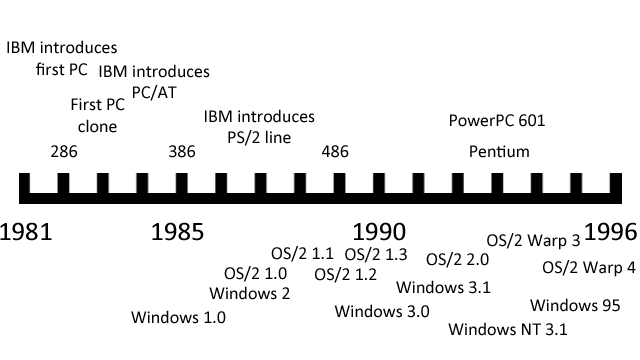
IBM went ahead and tried to produce a new model computer to stay ahead of the cloners, but the PC/AT’s day in the sun was short-lived. Intel was doing a great business selling 286 chips to clone companies, and buyers were excited to snap up 100 percent compatible AT clones at a fraction of IBM’s price.

Intel and Microsoft were getting rich, but IBM’s share of the PC pie was getting smaller and smaller each year. Something had to be done—the seeds were sown for the giant company to fight an epic battle to regain control of the computing landscape from the tiny upstarts.

IBM had only gone to Microsoft for an operating system in the first place because it was pressed for time. By 1980, the personal computing industry was taking off, causing a tiny revolution in businesses all over the world. Most big companies had, or had access to, IBM mainframes. But these were slow and clunky machines, guarded by a priesthood of technical administrators and unavailable for personal use. People would slyly bring personal computers like the TRS-80, Osborne, and Apple II into work to help them get ahead of their coworkers, and they were often religious fanatics about them. “The concern was that we were losing the hearts and minds,” former IBM executive Jack Sams said in an interview. “So the order came down from on high: give us a machine to win us back the hearts and minds.” But the chairman of IBM worried that his company’s massive bureaucracy would make any internal PC project take years to produce, by which time the personal computer industry might already be completely taken over by non-IBM machines.

So a rogue group in Boca Raton, Florida—far away from IBM headquarters—was allowed to use a radical strategy to design and produce a machine using largely off-the-shelf parts and a third-party CPU, operating system, and programming languages. It went to Microsoft to get the last two, but Microsoft didn’t have the rights to sell them an OS and directed the group to Digital Research, who was preparing a 16-bit version of CP/M that would run on the 8088 CPU that IBM was putting into the PC. In what has become a legendary story, Digital Research sent IBM’s people away when Digital Research’s lawyers refused to sign a non-disclosure agreement. Microsoft, worried that the whole deal would fall apart, frantically purchased the rights to Tim Patterson’s QDOS (“Quick and Dirty Operating System”) from Seattle Computer Products. Microsoft “cleaned up” QDOS for IBM, getting rid of the unfortunate name and allowing the IBM PC to launch on schedule. Everyone was happy, except perhaps Digital Research’s founder, Gary Kildall.

But that was all in the past. It was now 1984, and IBM had a different problem: DOS was pretty much still a quick and dirty hack. The only real new thing that had been added to it was directory support so that files could be organized a bit better on the IBM PC/AT’s new hard disk. And thanks to the deal that IBM signed in 1980, the cloners could get the exact same copy of DOS and run exactly the same software. IBM needed to design a brand new operating system to differentiate the company from the clones. Committees were formed and meetings were held, and the new operating system was graced with a name: OS/2.

Long before operating systems got exciting names based on giant cats and towns in California named after dogs, most of their names were pretty boring. IBM would design a brand new mainframe and release an operating system with a similar moniker. So the new System/360 mainframe line would run the also brand-new OS/360. It was neat and tidy, just like an IBM suit and jacket.

IBM wanted to make a new kind of PC that couldn’t be as easily cloned as its first attempt, and the company also wanted to tie it, in a marketing kind of way, to its mainframes. So instead of a Personal Computer or PC, you would have a Personal System (PS), and since it was the successor to the PC, it would be called the PS/2. The new advanced operating system would be called OS/2.

Naming an OS was a lot easier than writing it, however, and IBM management still worried about the length of time that it would take to write such a thing itself. So instead, the group decided that IBM would design OS/2 but Microsoft would write most of the actual code. Unlike last time, IBM would fully own the rights to the product and only IBM could license it to third parties.

Why would Microsoft management agree to develop a project designed to eliminate the very cash cow that made them billionaires? Steve Ballmer explained:

“It was what we used to call at the time ‘Riding the Bear.' You just had to try to stay on the bear’s back, and the bear would twist and turn and try to throw you off, but we were going to stay on the bear, because the bear was the biggest, the most important… you just had to be with the bear, otherwise you would be under the bear.”

IBM was a somewhat angry bear at the time as the tiny ferrets of the clone industry continued to eat its lunch, and many industry people started taking OS/2 very, very seriously before it was even written. What it didn’t know was that events were going to conspire to make OS/2 a gigantic failure right out of the gate.

In 1984, IBM released the PC/AT, which sported Intel’s 80286 central processor. The very next year, however, Intel released a new chip, the 80386, that was better than the 286 in almost every way.

The 286 was a 16-bit CPU that could address up to 16 megabytes of random access memory (RAM) through a 24-bit address bus. It addressed this memory in a slightly different way from its older, slower cousin the 8086, and the 286 was the first Intel chip to have memory management tools built in. To use these tools, you had to enter what Intel called “protected mode," in which the 286 opened up all 24 bits of its memory lines and went full speed. If it wasn’t in protected mode, it was in “real” mode, where it acted like a faster 8086 chip and was limited to only one megabyte of RAM (the 640KB limit was an arbitrary choice by IBM to allow for the original PC to use the extra bits of memory for graphics and other operations).

The trouble with protected mode in the 286 was that when you were in it, you couldn’t get back to real mode without a reboot. Without real mode it was very difficult to run MS-DOS programs, which expected to have full access and control of the computer at all times. Bill Gates knew everything about the 286 chip and called it “brain-damaged," but for Intel, it was a transitional CPU that led to many of the design decisions of its successor.

The 386 was Intel’s first truly modern CPU. Not only could it access a staggering 4GB of RAM in 32-bit protected mode, but it also added a “Virtual 8086” mode that could run at the same time, allowing many full instances of MS-DOS applications to operate simultaneously without interfering with each other. Today we take virtualization for granted and happily run entire banks of operating systems at once on a single machine, but in 1985 the concept seemed like it was from the future. And for IBM, this future was scary.

The 386 was an expensive chip when it was introduced, but IBM’s experience with the PC/AT told the company that the price would clearly come down over time. And a PC with a 386 chip and a proper 386-optimized operating system, running multiple virtualized applications in a huge memory space… that sounded an awful lot like a mainframe, only at PC clone prices. So should OS/2 be designed for the 386? IBM’s mainframe division came down on this idea like a ton of bricks. Why design a system that could potentially render mainframes obsolete?

So OS/2 was to run on the 286, and DOS programs would have to run one at a time in a “compatibility box” if they could be run at all. This wasn’t such a bad thing from IBM’s perspective, as it would force people to move to OS/2-native apps that much faster. So the decision was made, and Microsoft and Bill Gates would just have to live with it.

There was another problem that was happening in 1985, and both IBM and Microsoft were painfully aware of it. The launch of the Macintosh in ’84 and the Amiga and Atari ST in ’85 showed that reasonably priced personal computers were now expected to come with a graphical user interface (GUI) built in. Microsoft rushed to release the laughably underpowered Windows 1.0 in the same year so that it could have a stake in the GUI game. IBM would have to do the same or fall behind.

The trouble was that GUIs took a while to develop, and they took up more resources than their non-GUI counterparts. In a world where most 286 clones came with only 1MB RAM standard, this was going to pose a problem. Some GUIs, like the Workbench that ran on the highly advanced Amiga OS, could squeeze into a small amount of RAM, but AmigaOS was designed by a tiny group of crazy geniuses. OS/2 was being designed by a giant IBM committee. The end result was never going to be pretty.

OS/2 was plagued by delays and bureaucratic infighting. IBM rules about confidentiality meant that some Microsoft employees were unable to talk to other Microsoft employees without a legal translator between them. IBM also insisted that Microsoft would get paid by the company's standard contractor rates, which were calculated by “kLOCs," or a thousand lines of code. As many programmers know, given two routines that can accomplish the same feat, the one with fewer lines of code is generally superior—it will tend to use less CPU, take up less RAM, and be easier to debug and maintain. But IBM insisted on the kLOC methodology.

All these problems meant that when OS/2 1.0 was released in December 1987, it was not exactly the leanest operating system on the block. Worse than that, the GUI wasn’t even ready yet, so in a world of Macs and Amigas and even Microsoft Windows, OS/2 came out proudly dressed up in black-and-white, 80-column, monospaced text.

OS/2 did have some advantages over the DOS it was meant to replace—it could multitask its own applications, and each application would have a modicum of protection from the others thanks to the 286’s memory management facilities. But OS/2 applications were rather thin on the ground at launch, because despite the monumental hype over the OS, it was still starting out at ground zero in terms of market share. Even this might have been something that could be overcome were it not for the RAM crisis.

RAM prices had been trending down for years, from $880 per MB in 1985 to a low of $133 per MB in 1987. This trend sharply reversed in 1988 when demand for RAM and production difficulties in making larger RAM chips caused a sudden shortfall in the market. With greater demand and constricted supply, RAM prices shot up to over $500 per MB and stayed there for two years.

Buyers of clone computers had a choice: they could stick with the standard 1MB of RAM and be very happy running DOS programs and maybe even a Windows app (Windows 2.0 had come out in December of 1987 and while it wasn’t great, it was at least reasonable, and it did barely manage to run with that much memory). Or they could buy a copy of OS/2 1.0 Standard Edition from IBM for $325 and then pay an extra $1,000 to bump up to 3MB of RAM, which was necessary to run both OS/2 and its applications comfortably.

Needless to say, OS/2 was not an instant smash hit in the marketplace.

But wait. Wasn’t OS/2 supposed to be a differentiator for IBM to sell its shiny new PS/2 computers? Why would IBM want to sell it to the owners of clone computers anyway? Wasn’t it necessary to own a PS/2 in order to run OS/2 in the first place?

This confusion wasn’t an accident. IBM wanted people to think this way.

IBM had spent a lot of time and money developing the PS/2 line of computers, which was released in 1987, slightly before OS/2 first became available. The company ditched the old 16-bit Industry Standard Architecture (ISA), which had become the standard among all clone computers, and replaced it with its proprietary Micro Channel Architecture (MCA), a 32-bit bus that was theoretically faster. To stymie the clone makers, IBM infused MCA with the most advanced legal technology available, so much so that third-party makers of MCA expansion cards actually had to pay IBM a royalty for every card sold. In fact, IBM even tried to collect back-pay royalties for ISA cards that had been sold in the past.

The PS/2s also were the first PCs to switch over to 3.5-inch floppy drives, and they also pioneered the little round connectors for the keyboard and mouse that remain on some motherboards to this day. They were attractively packaged and fairly reasonably priced at the low end, but the performance just wasn’t there. The PS/2 line started with the Models 25 and 30, which had no Micro Channel and only a lowly 8086 running at conservatively slow clock speeds. They were meant to get buyers interested in moving up to the Models 50 and 60, which used 286 chips and had MCA slots, and the high-end Models 70 and 80, which came with a 386 chip and a jaw-droppingly high price tag to go with it. You could order the Model 50 and higher with OS/2 once it became available. You didn’t just have to stick with the “Standard Edition" either. IBM also offered an “Extended Edition” of OS/2 that came equipped with a communications suite, networking tools, and an SQL manager. The Extended Edition would only run on true-blue IBM PS/2 computers—no clones were allowed to that fancy dress party.

These machines were meant to wrestle control of the PC industry away from the clone makers, but they were also meant to subtly push people back toward a world where PCs were the servants and mainframes were the masters. They were never allowed to be too fast or run a proper operating system that would take advantage of the 32-bit computing power available with the 386 chip. In trying to do two contradictory things at once, they failed at both.

The clone industry decided not to bother tangling with IBM’s massive legal department and simply didn’t try to clone the PS/2 on anything other than a cosmetic level. Sure, they couldn’t have the shiny new MCA expansion slots, but since MCA cards were rare and expensive and the performance was throttled back anyway, it wasn’t so bad to stick with ISA slots instead. Compaq even brought together a consortium of PC clone vendors to create a new standard bus called EISA, which filled in the gaps at the high end until other standards became available. And the crown jewel of the PS/2, the OS/2 operating system, was late. It was also initially GUI-less, and when the GUI did come with the release of OS/2 1.1 in 1988, it required too much RAM to be economically viable for most users.

As the market shifted and the clone makers started selling more and more fast and cheap 386 boxes with ISA slots, Bill Gates took one of his famous “reading week” vacations and emerged with the idea that OS/2 probably didn’t have a great future. Maybe the IBM Bear was getting ready to ride straight off a cliff. But how does one disentangle from riding a bear, anyway? The answer was "very, very carefully."

It was late 1989, and Microsoft was hard at work putting the final touches on what the company knew was the best release of Windows yet. Version 3.0 was going to up the graphical ante with an exciting new 3D beveled design (which had first appeared with OS/2 1.2) and shiny new icons, and it would support Virtual 8086 mode on a 386, making it easier for people to spend more time in Windows and less time in DOS. It was going to be an exciting product, and Microsoft told IBM so.

IBM still saw Microsoft as a partner in the operating systems business, and it offered to help the smaller company by doing a full promotional rollout of Windows 3.0. But in exchange, IBM wanted to buy out the rights to the software itself, nullifying the DOS agreement that let Microsoft license to third parties. Bill Gates looked at this and thought about it carefully—and he decided to walk away from the deal.

IBM saw this as a betrayal and circulated internal memos that the company would no longer be writing any third-party applications for Windows. The separation was about to get nasty.

Unfortunately, Microsoft still had contractual obligations for developing OS/2. IBM, in a fit of pique, decided that it no longer needed the software company’s help. In an apt twist given the operating system’s name, the two companies decided to split OS/2 down the middle. At the time, this parting of the ways was compared to a divorce.

IBM would take over the development of OS/2 1.x, including the upcoming 1.3 release that was intended to lower RAM requirements. It would also take over the work that had already been done on OS/2 2.0, which was the long-awaited 32-bit rewrite. By this time, IBM finally bowed to the inevitable and admitted its flagship OS really needed to be detached from the 286 chip.

Microsoft would retain its existing rights to Windows, minus IBM’s marketing support, and the company would also take over the rights to develop OS/2 3.0. This was known internally as OS/2 NT, a pie-in-the-sky rewrite of the operating system that would have some unspecified “New Technology” in it and be really advanced and platform-independent. It might have seemed that IBM was happy to get rid of the new high-end variant of OS/2 given that it would also encroach on mainframe territory, but in fact IBM had high-end plans of its own.

OS/2 1.3 was released in 1991 to modest success, partly because RAM prices finally declined and the new version didn’t demand quite so much of it. However, by this time Windows 3 had taken off like a rocket. It looked a lot like OS/2 on the surface, but it cost less, took fewer resources, and didn’t have a funny kind-of-but-not-really tie-in to the PS/2 line of computers. Microsoft also aggressively courted the clone manufacturers with incredibly attractive bundling deals, putting Windows 3 on most new computers sold.

IBM was losing control of the PC industry all over again. The market hadn’t swung away from the clones, and it was Windows, not OS/2, that was the true successor to DOS. If the bear had been angry before, now it was outraged. It was going to fight Microsoft on its own turf, hoping to destroy the Windows upstart forever. The stage was set for an epic battle.

IBM had actually been working on OS/2 2.0 for a long time in conjunction with Microsoft, and a lot of code was already written by the time the two companies split up in 1990. This enabled IBM to release OS/2 2.0 in April of 1992, a month after Microsoft launched Windows 3.1. Game on.

OS/2 2.0 was a 32-bit operating system, but it still contained large portions of 16-bit code from its 1.x predecessors. The High Performance File System (HPFS) was one of the subsystems that was still 16-bit, along with many device drivers and the Graphics Engine that ran the GUI. Still, the things that needed to be in 32-bit code were, like the kernel and the memory manager.

IBM had also gone on a major shopping expedition for any kind of new technologies that might help make OS/2 fancier and shinier. It had partnered with Apple to work on next-generation OS technologies and licensed NeXTStep from Steve Jobs. While technology from these two platforms didn’t directly make it into OS/2, a portion of code from the Amiga did: IBM gave Commodore a license to its REXX scripting language in exchange for some Amiga technology and GUI ideas, and included them with OS/2 2.0.

At the time, the hottest industry buzzword was “object-oriented.” While object-oriented programming had been around for many years, it was just starting to gain traction on personal computers. IBM itself was a veteran of object-oriented technology, having developed its own Smalltalk implementation called Visual Age in the 1980s. So it made sense that IBM would want to trumpet OS/2 as being more object-oriented than anything else. The tricky part of this task is that object orientation is mostly an internal technical matter of how program code is constructed and isn’t visible by end users.

IBM decided to make the user interface of OS/2 2.0 behave in a manner that was “object oriented.” This project ended up being called the Workplace Shell, and it became, simultaneously, the number one feature that OS/2 fans both adored and despised.

As the default desktop of OS/2, 2.0 was rather plain and the icons weren’t especially striking, it was not immediately obvious what was new and different about the Workplace Shell. As soon as you started using it, however, you saw that it was very different from other GUIs. Right-clicking on any icon brought up a contextual menu, something that hadn’t been seen before. Icons were considered to be “objects,” and you could do things with them that were vaguely object-like. Drag an icon to the printer icon and it printed. Drag an icon to the shredder and it was deleted (yes, permanently!) There was a strange icon called “Templates” that you could open up and then “drag off” blank sheets that, if you clicked on them, would open up various applications (the Apple Lisa had done something similar in 1983). Was that object-y enough for OS/2? No. Not nearly enough.

Each folder window could have various things dragged to it, and they would have different actions. If you dragged in a color from the color palette, the folder would now have that background color. You could do the same with wallpaper bitmaps. And fonts. In fact, you could do all three and quickly change any folder to a hideous combination, and each folder could be differently styled in this fashion.

In practice, this was something you either did by accident and then didn’t know how to fix or did once to demo it to a friend and then never did it again. These kinds of features were flashy, but they took up a lot of memory, and computers in 1992 were still typically sold with 2MB or 4MB of RAM.

The minimum requirement of OS/2 2.0, as displayed on the box (and a heavy box it was, coming with no less than 21 3.5-inch floppy disks!), was 4MB of RAM. I once witnessed my local Egghead dealer trying to boot up OS/2 on a system with that much RAM. It wasn’t pretty. The operating system started thrashing to disk to swap out RAM before it was even finished booting. Then it would try to boot some more. And swap. And boot. And swap. It probably took over 10 minutes to get to a functional desktop, and guess what happened if you right-clicked a single icon? It swapped. Basically, OS/2 2.0 in this amount of RAM was unusable.

At 8MB the system worked as advertised, and at 16MB it would run comfortably without excessive thrashing. Fortunately, RAM was down to around $30 per MB by this time, so upgrading wasn’t as huge a deal as it was in the OS/2 1.x days. Still, it was a barrier to adoption, especially as Windows 3.1 ran happily in 2MB.

But Windows 3.1 was also a crash-happy, cooperative multitasking facade of an operating system with a strange, bifurcated user interface that only Bill Gates could love. OS/2 aspired to do something better. And in many ways, it did.

Despite the success of the original PC, IBM was never really a consumer company and never really understood marketing to individual people. The PS/2 launch, for example, was accompanied by an advertising push that featured the aging and somewhat befuddled cast of the 1970s TV series M*A*S*H.

This tone-deaf approach to marketing continued with OS/2. Exactly what was it, and how did it make your computer better? Was it enough to justify the extra cost of the OS and the RAM to run it well? Superior multitasking was one answer, but it was hard to understand the benefits by watching a long and boring shot of a man playing snooker. The choice of advertising spending was also somewhat curious. For years, IBM paid to sponsor the Fiesta Bowl, and it spent most of OS/2’s yearly ad budget on that one venue. Were college football fans really the best audience for multitasking operating systems?

Eventually IBM settled on a tagline for OS/2 2.0: “A better DOS than DOS, and a better Windows than Windows.” This was definitely true for the first claim and arguably true for the second. It was also a tagline that ultimately doomed the operating system.

OS/2 had the best DOS virtual machine ever seen at the time. It was so good that you could easily run DOS games fullscreen while multitasking in the background, and many games (like Wing Commander) even worked in a 320x200 window. OS/2’s DOS box was so good that you could run an entire copy of Windows inside it, and thanks to IBM’s separation agreement with Microsoft, each copy of OS/2 came bundled with something IBM called “Win-OS2.” It was essentially a free copy of Windows that ran either full-screen or windowed. If you had enough RAM, you could run each Windows app in a completely separate virtual machine running its own copy of Windows, so a single app crash wouldn’t take down any of the others.

This was a really cool feature, but it made it simple for GUI application developers to decide which operating system to support. OS/2 ran Windows apps really well out of the box, so they could just write a Windows app and both platforms would be able to run that app. On the other hand, writing a native OS/2 application was a lot of work for Windows developers. The underlying application programming interfaces (APIs) were very different between the two: Windows used a barebones set of APIs called Win16, while OS/2 had a more expansive set with the unwieldy name of Presentation Manager. The two differed in many ways, even in terms of whether you counted the number of pixels to position a window from the top or from the bottom of the screen.

Some companies did end up making native OS/2 Presentation Manager applications, but they were few and far between. IBM was one, of course, and it was joined by Lotus, who was still angry at Microsoft for its alleged efforts against the company in the past. Really, though, what angered Lotus (and others, like Corel) about Microsoft was the sudden success of Windows and the skyrocketing sales of Microsoft applications that ran on it: Word, Excel, and PowerPoint. In the DOS days, Microsoft made the operating system for PCs, but it was an also-ran in the application side of things. As the world shifted to Windows, Microsoft was pushing application developers aside. Writing apps for OS/2 was one way to fight back.

It was also an opening for startup companies who didn’t want to struggle against Microsoft for a share of the application pie. One of these companies was DeScribe, who made a very good word processor for OS/2 (that I once purchased with my own money on a student budget). For an aspiring writer, DeScribe offered a nice clean writing slate that supported long filenames. Word for Windows, like Windows itself, was still limited to eight characters.

Unfortunately, the tiny companies like DeScribe ended up doing a much better job with their applications than the established giants like Lotus and Corel. The OS/2 versions of 1-2-3 and Draw were slow, memory-hogging, and buggy. This put an even bigger wet blanket over the native OS/2 applications market. Why buy a native app when the Windows version ran faster and better and could run seamlessly in Win-OS2?

As things got more desperate on the native applications front, IBM even started paying developers to write OS/2 apps. (Borland was the biggest name in this effort.) This worked about as well as you might expect: Borland had no incentive to make its apps fast or bug-free, just to ship them as quickly as possible. They barely made a dent in the market.

Still, although OS/2’s native app situation was looking dire, the operating system itself was selling quite well, reaching one million sales and hitting many software best-seller charts. Many users became religious fanatics about how the operating system could transform the way you used your computer. And compared to Windows 3.1, it was indeed a transformation. But there was another shadow lurking on the horizon.

When faced with a bear attack, most people would run away. Microsoft’s reaction to IBM’s challenge was to run away, build a fort, then build a bigger fort, then build a giant metal fortress armed with automatic weapons and laser cannons.

In 1993, Microsoft released Windows for Workgroups 3.11, which bundled small business networking with a bunch of small fixes and improvements, including some 32-bit code. While it did not sell well immediately (a Microsoft manager once joked that the internal name for the product was "Windows for Warehouses"), it was a significant step forward for the product. Microsoft was also working on Windows 4.0, which was going to feature much more 32-bit code, a new user interface, and pre-emptive multitasking. It was codenamed Chicago.

Finally, and most importantly for the future of the company, Bill Gates hired the architect of the industrial-strength minicomputer operating system VMS and put him in charge of the OS/2 3.0 NT group. Dave Cutler’s first directive was to throw away all the old OS/2 code and start from scratch. The company wanted to build a high-performance, fault-tolerant, platform-independent, and fully networkable operating system. It would be known as Windows NT.

IBM was aware of Microsoft’s plans and started preparing a new major release of OS/2 aimed squarely at them. Windows 4.0 was experiencing several public delays, so IBM decided to take a friendly bear swipe at its opponent. The third beta of OS/2 3.0 (thankfully, now delivered on a CD-ROM) was emblazoned with the words “Arrive in Chicago earlier than expected.”

OS/2 version 3.0 would also come with a new name, and unlike codenames in the past, IBM decided to put it right on the box. It was to be called OS/2 Warp. Warp stood for "warp speed," and this was meant to evoke power and velocity. Unfortunately, IBM’s famous lawyers were asleep on the job and forgot to run this by Paramount, owners of the Star Trek license. It turns out that IBM would need permission to simulate even a generic “jump to warp speed” on advertising for a consumer product, and Paramount wouldn’t give it. IBM was in a quandary. The name was already public, and the company couldn’t use Warp in any sense related to spaceships. IBM had to settle for the more classic meaning of Warp—something bent or twisted. This, needless to say, isn’t exactly the impression you want to give for a new product. At the launch of OS/2 Warp in 1994, Patrick Stewart was supposed to be the master of ceremonies, but he backed down and IBM was forced to settle for Voyager captain Kate Mulgrew.

OS/2 Warp came in two versions: one with a blue spine on the box that contained a copy of Win-OS2 and one with a red spine that required the user to use the copy of Windows that they probably already had to run Windows applications. The red-spined box was considerably cheaper and became the best-selling version of OS/2 yet.

However, Chicago, now called Windows 95, was rapidly approaching, and it was going to be nothing but bad news for IBM. It would be easy to assume, but not entirely correct, that Windows won over OS/2 because of IBM’s poor marketing efforts. It would be somewhat more correct to assume that Windows won out because of Microsoft’s aggressive courting of the clone computer companies. But the brutal, painful truth, at least for an OS/2 zealot like me, was that Windows 95 was simply a better product.

For several months, I dual-booted both OS/2 Warp and a late beta of Windows 95 on the same computer: a 486 with 16MB of RAM. After extensive testing, I was forced to conclude that Windows 95, even in beta form, was faster and smoother. It also had better native applications and (this was the real kicker) crashed less often.

How could this be? OS/2 Warp was now a fully 32-bit operating system with memory protection and preemptive multitasking, whereas Windows 95 was still a horrible mutant hybrid of 16-bit Windows with 32-bit code. By all rights, OS/2 shouldn’t have crashed—ever. And yet it did. All the time.

Unfortunately, OS/2 had a crucial flaw in its design: a Synchronous Input Queue (SIQ). What this meant was that all messages to the GUI window server went through a single tollbooth. If any OS/2 native GUI app ever stopped servicing its window messages, the entire GUI would get stuck and the system froze. OK, technically the operating system was still running. Background tasks continued to execute just fine. You just couldn’t see them or interact with them or do anything, because the entire GUI was hung. Some enterprising OS/2 fan wrote an application that polled the joystick port and was supposed to unstick things when the user pressed a button. It rarely worked.

Ironically, if you never ran native OS/2 applications and just ran DOS and Windows apps in a VM, the operating system was much more stable.

OS/2’s fortune wasn’t helped by reports that users of IBM’s own Aptiva series had trouble installing it on their computers. IBM’s PC division also needed licenses from Microsoft to bundle Windows 95 with its systems, and Microsoft got quite petulant with its former partner, even demanding at one point that IBM stop all development on OS/2. IBM’s PC division ended up signing a license the same day that Windows 95 was released.

Microsoft really didn’t need to stoop to these levels. Windows 95 was a smash success, breaking all previous records for sales of operating systems. It changed the entire landscape of computing. Commodore and Atari were now out of the picture, and Apple was sent reeling by Windows 95’s success. IBM was in for the fight of its life, and its main weapon wasn’t up to snuff.

IBM wouldn’t give up the fight just yet, however. Big Blue had plans for taking back its rightful place at the head of the computing industry, and it was going to ally with everyone who wasn’t Microsoft if it could help it.

First up on its list of companies to crush: Intel. IBM, along with Sun, had been an early pioneer of a new type of microprocessor design called Reduced Instruction Set Computing (RISC). Basically, the idea was to cut out long and complicated instructions in favor of simpler tasks that could be done more quickly. IBM created a CPU called POWER (Performance Optimization With Enhanced RISC) and used it in its line of very expensive workstations.

IBM had already started a collaboration with Apple and Motorola to bring its groundbreaking POWER RISC processor technology to the desktop, and it used this influence to join Apple’s new operating system development project, which was then codenamed “Pink." The new OS venture was renamed Taligent, and the prospective kernel changed from an Apple-designed microkernel called Opus to a microkernel that IBM was developing for an even grander operating system that it named Workplace OS.

Workplace OS was to be the Ultimate Operating System, the OS to end all OSes. It would run on the Mach 3.0 microkernel developed at Carnegie Mellon University, and on top of that, the OS would run various “personalities,” including DOS, Windows, Macintosh, OS/400, AIX, and of course OS/2. It would run on every processor architecture under the sun, but it would mostly showcase the power of POWER. It would be all-singing and all-dancing.

And IBM never quite got around to finishing it.

Meanwhile, Dave Cutler’s team at Microsoft already shipped the first version of Windows NT (version 3.1) in July of 1993. It had higher resource requirements than OS/2, but it also did a lot more: it supported multiple CPUs, and it was multiplatform, ridiculously stable and fault-tolerant, fully 32-bit with an advanced 64-bit file system, and compatible with Windows applications. (It even had networking built in.) Windows NT 3.5 was released a year later, and a major new release with the Windows 95 user interface was planned for 1996. While Windows NT struggled to find a market in the early days of its life, it did everything it was advertised to do and ended up merging with the consumer Windows 9x series by 2001 with the release of Windows XP.

In the meantime, the PowerPC chip, which was based on IBM’s POWER designs (but was much cheaper), was released in partnership with Motorola and ended up saving Apple’s Macintosh division. However, plans to release consumer PowerPC machines to run other operating systems were perpetually delayed. One of the main problems was a lack of alternate operating systems. Taligent ran into development hell, was repositioned as a development environment, and was then canned completely. IBM hastily wrote an experimental port of OS/2 Warp for PowerPC, but abandoned it before it was finished. Workplace OS never got out of early alpha stages. Ironically, Windows NT was the only non-Macintosh consumer operating system to ship with PowerPC support. But the advantages of running a PowerPC system with Windows NT over an Intel system running Windows NT were few. The PowerPC chip was slightly faster, but it required native applications to be recompiled for its instruction set. Windows application vendors saw no reason to recompile their apps for a new platform, and most of them didn’t.

So to sum up: the new PowerPC was meant to take out Intel, but it didn’t do anything beyond saving the Macintosh. The new Workplace OS was meant to take out Windows NT, but IBM couldn’t finish it. And OS/2 was meant to take out Windows 95, but the exact opposite happened.

In 1996, IBM released OS/2 Warp 4, which included a revamped Workplace Shell, bundled Java and development tools, and a long-awaited fix for the Synchronous Input Queue. It wasn’t nearly enough. Sales of OS/2 dwindled while sales of Windows 95 continued to rise. IBM commissioned an internal study to reevaluate the commercial potential of OS/2 versus Windows, and the results weren’t pretty. The order came down from the top of the company: the OS/2 development lab in Boca Raton would be eliminated, Workplace OS would be killed, and over 1,300 people would lose their jobs. The Bear, beaten and bloodied, had left the field.

IBM would no longer develop new versions of OS/2, although it continued selling it until 2001. Who was buying it? Mostly banks, who were still wedded to IBM’s mainframes. The banks mostly used it in their automated teller machines, but Windows NT eventually took over this tiny market as well. After 2001, IBM stopped selling OS/2 directly and instead utilized Serenity Systems, one of its authorized business dealers, who rechristened the operating system as eComStation. You can still purchase eComStation today (some people do), but copies are very, very rare. Serenity Systems continues to release updates that add driver support for modern hardware, but the company is not actively developing the operating system itself. There simply isn’t enough demand to make such an enterprise profitable.

In December 2004, IBM announced that it was selling its entire PC division to the Chinese company Lenovo, marking the definitive end of a 23-year reign of selling personal computers. For nearly 10 of those 23 years, IBM tried in vain to replace the PC’s Microsoft-owned operating system with one of its own. Ultimately, it failed.

Many OS/2 fans petitioned IBM for years to free up the operating system’s code base to an open source license, but IBM has steadily refused. The company is probably unable to, as OS/2 still contains large chunks of proprietary code belonging to other companies—most significantly, Microsoft.

Most people who want to use OS/2 today are coming from a historical interest only, and their task is made more difficult by the fact that OS/2 has difficulty running under virtual machines such as VMWare. A Russian company was hired by a major bank in Moscow in the late 1990s to find a solution for their legacy OS/2 applications. It ended up writing its own virtual machine solution that became Parallels, a popular application that today allows Macintosh users to run Windows apps on OSX. In an eerie way, running Parallels today reminds me a lot of running Win-OS2 on OS/2 in the mid-1990s. Apple, perhaps wisely, has never bundled Parallels with its Mac computers.

So why did IBM fail so badly with OS/2? Why was Microsoft able to deftly cut IBM out of the picture and then beat it to death with Windows? And more importantly, are there any lessons from this story that might apply to hardware and software companies today?

IBM ignored the personal computer industry long enough that it was forced to rush out a PC design that was easy (and legal) to clone. Having done so, the company immediately wanted to put the genie back in the bottle and take the industry back from the copycats. When IBM announced the PS/2 and OS/2, many industry pundits seriously thought the company could do it.

Unfortunately, IBM was being pulled in two directions. The company's legacy mainframe division didn’t want any PCs that were too powerful, lest they take away the market for big iron. The PC division just wanted to sell lots of personal computers and didn’t care what it had to do in order to meet that goal. This fighting went back and forth, resulting in agonizing situations such as IBM’s own low-end Aptivas being unable to run OS/2 properly and the PC division promoting Windows instead.

IBM always thought that PCs would be best utilized as terminals that served the big mainframes it knew and loved. OS/2’s networking tools, available only in the Extended Edition, were mostly based on the assumption that PCs would connect to big iron servers that did the heavy lifting. This was a “top-down” approach to connecting computers together. In contrast, Microsoft approached networking from a “bottom-up” approach where the server was just another PC running Windows. As personal computing power grew and more robust versions of Windows like NT became available, this bottom-up approach became more and more viable. It's certainly much less expensive.

IBM also made a crucial error in promoting OS/2 as a “better DOS than DOS and a better Windows than Windows.” Having such amazing compatibility with other popular operating systems out of the box meant that the market for native OS/2 apps never had a chance to develop. Many people bought OS/2. Very few people bought OS/2 applications.

The book The Innovator’s Dilemma makes a very good case that big companies with dominant positions in legacy markets are institutionally incapable of shifting over to a new disruptive technology, even though those companies frequently invent said technologies themselves. IBM invented more computer technologies and holds more patents than any other computer company in history. Still, when push came to shove, it gave up the personal computer in favor of hanging on to the mainframe. IBM still sells mainframes today and makes good money doing so, but the company is no longer a force in personal computers.

Today, many people have observed that Microsoft is the new dominant force in legacy computing, with legacy redefined as a personal computer running Windows. The new disruptive force is smartphones and tablets, an area in which Apple and Google have become the new dominant forces. Microsoft, to its credit, responded as quickly as it was able to meet this new disruption. The company even re-designed its legacy user interface (the Windows desktop) to be more suited to tablets.

It could be argued that Microsoft was slow to act, just as IBM was. It could also be argued that Windows Phone and Surface tablets have failed to capture market share against iOS and Android in the same way that OS/2 failed to beat back Windows. However, there is one difference that separates Microsoft from most legacy companies: the company doesn’t give up. IBM threw in the towel on OS/2 and then on PCs in general. Microsoft is willing to spend as many billions as it takes in order to claw its way back to a position of power in the new mobile landscape. Microsoft still might not succeed, but for now at least, it's going to keep trying.

The second lesson of OS/2—to not be too compatible out of the box with rival operating systems—is a lesson that today’s phone and tablet makers should take seriously. Blackberry once touted that you could easily run Android apps on its BB10 operating system, but that ended up not helping the company at all. Alternative phone operating system vendors should think very carefully before building in Android app compatibility, lest they suffer the same fate as OS/2.

The story of OS/2 is now fading into the past. In today’s fast-paced computing environment, it may not seem particularly relevant. But it remains a story of how a giant, global mega-corporation tried to take on a young and feisty upstart and ended up retreating in utter defeat. Such stories are rare, and because of that rarity they become more precious. It’s important to remember that IBM was not the underdog. It had the resources, the technology, and the talent to crush the much smaller Microsoft. What it didn’t have was the will.
paserbyp: (Default)
There's a best first programming to learn in the first place? I'd argue, given that the essentials of programming are prevalent in any language, it really doesn't matter which one you learn first.

Let me put it another way. For a newborn child, does it really matter which language she learns first? Is it better to learn Chinese or English? Why not Arabic or Swedish first? The fact is that the child is going to learn a language no matter what. It's part of human development. The real question is: Will the child master the language?

At a high level, every language has the same building blocks: nouns, verbs, adverbs, conjunctions and so on. What makes a language different are the sounds associated with its words, its grammar and its idioms. Some linguists even go so far as to assert that a human is born with an innate capacity for language.

The same can be said of programming languages. At a high level, they all have the same building blocks: variables, operators, statements, structures, etc. Yes, some programming languages have features that are designed to handle special technologies -- threading, for example. But at the building block level, the ways these "best first programming languages to learn" work are surprisingly similar. If-then-else statements need a condition. Loops need some sort of iteration mechanism. Operators need behavior. You get the picture.

It seems that most of the effort that gets put into teaching programming languages is focused on making the code understandable to the compiler/interpreter. That's the syntax. The semantics you'll have to master way down the line, if at all. There's a good argument to be made that, if we taught English the way we teach computer programming, students would never get past verb-tense agreement.

As important as syntax is in the use of the language -- and it's very important -- the purpose of language is not to master syntax. I have yet to come across an aspiring programmer who gets excited about learning the format of a print statement. Yet, once that print statement is used to create the initial Hello World program, the lights go off.

Most developers I know want to make code that has meaning. This is not to say that mastering the syntax of a language is just a grueling necessity. There is a certain beauty in the elegant use of syntax. Just ask anybody who's written an extraordinarily complex yet efficient sorting algorithm. You really do need to know how the language works in order to pull off such a feat. But the real value of such code comes from the behaviors the algorithm produces and the ideas it helps express. It's the semantics that gives the code value.

My first programming language was PL/I. I learned just enough to be able to take some input from the terminal and do some simple math. Also, I learned how to write if-then and print statements in response to input. The first program I wrote told jokes. Here is one example:

> Want to hear a joke? [Enter yes or no]
> yes
> Two peanuts were walking down the street. One was assaulted.

That's it. Some would say that the humor is questionable, and my mastery of the syntax was elementary. Yet, the semantics had enormous value for me and, surprisingly, for others. Turns out, people liked the jokes. And, on top of it all, I had found a method of creative expression that was versatile, powerful and interactive. Computer programming provided a type of creative expression that was hard to find elsewhere. It still does.

It would take a decade more for me to take a professional interest in the technology. But to this day, I remember that little joke program. It changed the way I thought. Did it matter that I was starting at PL/I? Should I have started with COBOL? Would that have made me a better programmer in the years to come? I don't think so. I had to begin somewhere, and PL/I was the starting point.

For me, it's never been about the syntax of the language. While I've always placed importance on learning syntax, its mastery has never been the goal. I care about the ideas that the syntax enables me to express. Still, we need to begin somewhere. If you want to know what I think is the best first programming language for a beginner to learn, my answer is this: the one in front of you.
paserbyp: (Default)
A new study shows that, in tech, over one-third of professionals admit they have issues with depression. Specifically, 38.8 percent of tech pros responding to a Blind survey say they’re depressed. When you tie employers into this, the main offenders are Amazon and Microsoft, where 43.4 percent and 41.58 percent (respectively) of employees say they’re depressed. Intel rounds out the top three with 38.86 percent of its respondents reporting issues with depression.

I’ll point out the top three companies may not be entirely to blame for the depression concerns of tech pros. All three have large footprints in the Pacific Northwest, where the shorter daylight of Fall and Winter contribute to Seasonal Affective Disorder, or SAD. This narrow window of daylight, along with routine overcast or rainy conditions, can throw off a body’s circadian rhythm. Seattle psychiatrist David Avery tells The Seattle Times that less daylight can also affect the brain’s hypothalamus, which directs the body’s release of hormones such as melatonin and cortisol. (It’s worth noting Blind didn’t identify any geographical data about respondents to its depression survey.)

There are similarities between this depression survey and other Blind studies. Over one-third of tech pros report being depressed; over half say their workplace is unhealthy; nearly 60 percent report burnout. An anonymous Dice survey shows most tech pros are dissatisfied with their job enough to consider seeking new employment elsewhere. In other words, across the industry, there’s a strong sense of dissatisfaction amongst tech pros.

At least when it comes to users, tech companies seem to realize their products have an impact on mental health. At WWDC 2018, Apple introduced App Limits, a method to reduce how often you use your phone, particularly the apps on it; it seems to focus in particular on social media, which has been proven many times to directly link to depression.

The upside to this survey is that most tech pros aren’t reporting depression issues. While that’s wonderful, we can’t overlook the nearly 40 percent of tech pros who admit feeling depressed. If you feel similarly, please reach out to a mental health professional for guidance and best practices to deal with your depression the right way.

More details: http://blog.teamblind.com/index.php/2018/12/03/39-percent-of-tech-workers-are-depressed
paserbyp: (Default)
Google last week found itself on the defensive after the Wall Street Journal published a lengthy report the practice by the company and some other email provides of allowing third-party software developers to access the contents of email messages of people using their apps. In a blog July 3, Google Cloud's director of security, trust and privacy Suzzane Frey said the company allowed non-Google apps to access the Gmail content of users. But Frey maintained the access was only provided to carefully vetted third parties and with the full consent and knowledge of users. In order for a third-party app to access Gmail content, the app developer has to go through a multi-stage review process. The vetting includes manual and automated reviews of the developer's privacy practices and of the controls in the app itself. Google also ensures that before a third-party app can access a user's Gmail content, the user is fully informed of the types of data the app can access. Users have to grant explicit permission before an app can access their Gmail, Frey said.

"We continuously work to vet developers and their apps that integrate with Gmail before we open them for general access," Frey wrote. "We give both enterprise admins and individual consumers transparency and control over how their data is used."

Google lets hundreds of third-party software developers "to scan the inboxes of millions of Gmail users who signed up for email-based services offering shopping price comparisons, automated travel-itinerary planners or other tools." Often the scans are automated and designed to collect information that can later be sold to marketers for targeted advertising purposes. But in several cases, employees working for outside companies have read un-redacted emails of thousands of Gmail users.

Third-party developers have similar access with other email service providers including Microsoft and Verizon's Oath unit, which acquired Yahoo, the Journal said. But the concerns with Google are high because of the company's dominant presence in the email space with two-thirds of all active email users—some 1.5 billion—having a Gmail account. Contrary to Frey's claims about Google carefully monitoring third-party access to Gmail content, the company does little to police developers, the Journal said citing interviews with more than two-dozen current and former employees of email application developers.

While Google has several tough policies pertaining to how, when and why third parties can access Gmail content and how they can use it, the company seldom enforces those policies, the Journal reported. This is not the first time that Google has found itself on the defensive over the issue of email scanning. Until last year, the company scanned and used consumer Gmail content for ad personalization purposes. It stopped the practice last June amid growing privacy concerns over the practice. Now, the only reason why Google might read a user's email is when the user asks or gives consent to the company for doing so or if there is a security need for it, Frey said.
paserbyp: (Default)


In a decision with potentially far reaching implications for the software industry, the U.S. Court of Appeals for the Federal Circuit has once again ruled that Google's use of certain Java code in Android infringes upon Oracle's copyrights. The Appeals Court opinion on March 27 reverses a 2016 jury verdict and subsequent court decision in the U.S. District Court for the Northern District of California that went in favor of Google. The three-judge panel at the Federal Circuit that reviewed the case has remanded it back to the district court for a third trial to determine damages. The appellate court ruling means Google could owe Oracle billions of dollars for using Oracle code in its mobile operating system for at least a decade. Oracle has claimed more than $8 billion in damages from Google, but the actual amount could end up being higher because of how widely Android is currently used compared to when the lawsuit was first filed in 2010. Furthermore if the ruling withstands further appeals by Google and if Google ends up paying billions in damages to Oracle, it could have broad repercussions on how software developers use Java APIs when building software. The larger issue behind the ruling is how it might slow or even halt the use of programming APIs by developers. Other software vendors emboldened by Oracle's success might pursue copyright infringement litigation for various software development APIs.

The dispute between Oracle and Google involves 37 Java API packages that Oracle claims are copyrighted and patent protected and which Google has used in Android without obtaining a license first. Google has not disputed the use of the API packages in question, but has claimed the use is protected under fair use laws. While Oracle has claimed Google copied copyright protected content verbatim, Google has maintained the API packages it used are purely functional in nature and critical to write programs in Java. The company has essentially described its use of the APIs as meeting the definitions of both fair use and transformative under U.S. copyright laws. At the first trial, a jury agreed that Google had infringed on Oracle's copyright but couldn't come to a unanimous decision on the matter of fair use. The district court later held the APIs were not copyrightable given their functional nature and ruled in favor of Google. The Federal Circuit court ruled in Oracle’s appeal that certain declarative code and the structure, sequence and organization of the Java APIs are entitled to copyright protection and remanded the case back to the district court. This week's ruling follows a second jury trial on the matter, which also ended up being in Google's favor. As it did after the first trial, Oracle appealed the second trial result with the Federal Circuit court. This is the second-time the appeal's court has sided with Oracle's position on the matter. Google has previously attempted to get the US Supreme Court to review the core claims in the case, but so far the nation's highest court has declined to do so.

Bottom line is by ruling the APIs are copyrightable the U.S. circuit court has upended a standard software industry practice regarding the use of such code and created considerable legal uncertainty for developers.
paserbyp: (Default)


If you’re a tech worker looking for a change of pace—but not willing to make sacrifices when it comes to salary—your options are quickly expanding to include more than traditional tech hubs like the SF Bay Area and New York. While average tech salaries in the Bay Area still top the charts, there are other important factors to consider, such as how quickly salaries are growing in different locations, not to mention cost of living differences that make your earnings go further (or, in some cases, less far) in some cities. Specifically, one new analysis reveals that tech salaries (for roles in software engineering, design, product management, and data analytics) in Seattle, Austin, and Washington, DC are increasing at a faster rate than in any other cities included in the dataset. In this article we’ll dive into what those differences look like, and what that might mean looking towards the future.

On an aggregate level, Bay Area-based tech workers still make the most per year, with an average salary of $142K in 2017, as compared to a global average of $135K. Seattle came in second at $132K, and tech workers in New York and Los Angeles earned the same average salary of $129K. But these are just average salaries at one point in time, which don’t reflect where the various cities have come from—and therefore the upward (or downward) trajectory they’re on.

Austin was the clear winner in this analysis, with average tech salaries growing more than 7% from 2016 to 2017, from $110K to $118K. Los Angeles and Washington, D.C came in close second, both seeing salaries grow an average of 6%. On a global level, tech salaries grew by 5%—incidentally, the same rate that the Bay Area saw in the same time period. Surprisingly, some popular cities saw wage stagnation, or even declining salaries, between 2016 and 2017. Boston, for example, held steady with an average tech salary of $118K, whereas salaries in Denver fell from $114K to $112K. Salaries in international tech hubs, like London and Paris, were found to be significantly lower on average; $77K and $57K, respectively, in 2017.

Still further, comparing salaries across cities is a bit like comparing apples to oranges, as living costs vary significantly between the geographies analyzed—and each dollar therefore has a different value in each city. For example, while the Bay Area boasts the highest average salary, the cost of living there is also one of the highest, meaning that each dollar earned in San Francisco buys less than it would in a city such as Austin, for example. To account for this, you should ran a comparison by adjusting salaries for San Francisco cost of living—that is, you need to ask how much each salary would be worth if every city had the same cost of living as San Francisco. Under this analysis, Austin again came out on top, with an adjusted salary of $202K, followed by Los Angeles and Seattle at $182K. In the U.S., San Francisco and New York fared the worst, with respective adjusted salaries of $142K and $136K—not all that surprising given countless news headlines about rent and other astronomical expenses in both cities.

If you’re keen to try out an up-and-coming city with great potential upside, you might consider cities where salaries have been growing in recent years, such as Seattle, Austin, and Washington, D.C. In addition to being part of a newer startup scene, these cities may offer better growth potential than some of the more established tech cities. Another important factor to consider is cost of living across cities, as this can significantly impact your purchasing power—and while a salary may look lower at face value, a lower cost of living might increase the relative attractiveness of one city over another.
Geography is just one (important!) consideration as you think about your next tech job, but there are many other factors that affect who gets paid what.

Check out for a full analysis of tech salaries in 2017 and beyond here.
paserbyp: (Default)
Business PCs went mainstream in the 1990s. At the beginning of the decade, most people didn’t use PCs in offices. By 2000, pretty much all office work involved PCs. The use of mice and keyboards and the necessity of sitting and using a PC all day caused a pandemic of repetitive stress injuries, including carpal tunnel syndrome. It seems as if everybody got injured by their PCs at some point. It was common back then to see people wearing wrist braces. Companies invested in wrist pads, ergonomic mice and keyboards, and special foot rests. Insurance claims for medical treatment for carpal tunnel exploded. Then the 2000s hit. Mobile devices took off. Business technology use was diversified into laptops, BlackBerry pagers, PDAs and cellphones. We stopped hearing about carpal tunnel and starting hearing about “texting thumb” and other repetitive stress injuries related to typing on a phone or pager. Around ten years ago, the technology health problems shifted from the physical to the mental. Employees started suffering from all kinds of psychological syndromes, from nomophobia (fear of being without a phone) to phantom vibration syndrome (where you think you feel your phone vibrating even though your phone isn’t there) to screen insomnia to smartphone addiction. In recent years, our smartphones have begun harming health by giving us social media all day and all night, with notifications and alerts telling us something is happening. Millions of people are now suffering from smartphone addiction, which is really social media addiction, and, as I detailed in this space, it’s harming productivity, health and happiness.

And now management science has identified a collection of problems caused by the accumulated effect of all our technology, called “technostress.”

Technostress is actually not the latest malady in a series of technology-induced syndromes. In fact, it’s an umbrella term that encompasses all negative psychological effects that result from changes in technology.

Nomophobia, phantom vibration syndrome, screen insomnia, smartphone addiction, information overload, facebook fatigue, selfitis (the compulsive need to post selfies), social media distraction and the rest are all covered by the umbrella of “technostress.”

While ergonomics covers the physical effects of technology, technostress covers the mental effects.

Over time, technostress is increasingly related to compulsion. People now feel powerful anxiety when they’re not looking at their phones, fearing unseen important emails and work messages and a general sense of FOMO (fear of missing out) with the social networks.

While connected, people compulsively check all the incoming communications streams and feel compelled to respond. Time seems to stop, and the work hours spent on compulsive messaging and social media is usually considered to take far less time than it actually does.

By the end of the workday, employees are exhausted, feeling that they worked hard all day. But much of that fatigue is caused by the constant mental shifting from one communications medium to the next, and the anxiety and stress are caused by nonstop communication.

A survey of 20,000 European workers conducted by Microsoft and published this week found that technology causes stress, which lowers job satisfaction, organizational commitment and productivity.

Specifically, the survey found, the volume and relentlessness of email, text messages and social media posts distract and distress.

Microsoft makes the very good point that IT leaders readily accept the competitive necessity of digital disruption, as well as the need to do it right. But they also point out that doing it right means not only implementing new ways to work, but also helping employees with the stress of digital disruption.

In the past, employees were able to focus on work while at work and personal lives while not at work. Today, smartphones and communication and social apps keep a constant stream of work and personal messages coming in 24 hours a day, and it’s taking a toll.

Smartphone notifications interrupt, and those red circles with the numbers in them showing waiting messages draw people into those apps to check the messages.

Just a tiny fraction of those surveyed by Microsoft — only 11.4% — said they felt highly productive.

Technology, and the way it’s deployed, is not having the intended effect. It’s causing technostress, and lowering, rather than raising, productivity.

The main solution is a strong digital culture within an enterprise, according to Microsoft.

Surveyed workers employed by companies with a strong digital culture expressed a 22% rate of feeling highly productive, roughly double the average.

Here are examples of good digital culture practices:

* Put limits on email; no sending or replying to email after work hours.

* Measure employee happiness with technology with surveys of your own, and take action on the results.

* Focus on constructing the workday to enable flow, or concentrated deep work.

* Consider banning phones from meetings.

* Train employees on the causes and cures for technostress, including the management of social media usage.

* Encourage staff to take breaks, avoid work after hours and communicate more in person, rather than digitally.

Most importantly, take this seriously. It’s the kind of thing managers, especially in IT, tend to dismiss. (Microsoft’s survey points out that the most technical people are the least likely to suffer from technostress, and may therefore believe it’s not a big problem).

Technostress sounds like a fad disorder, a frothy buzzword without import. In fact, it’s probably the most costly problem in your organization.

Technostress is caused by changes in technology, and the pace of change will keep accelerating. Artificial intelligence, data analytics, robotics, the internet of things, virtual reality, augmented and artificial reality — these changes will bring technostress to a whole new level.

Cython

Feb. 8th, 2018 03:01 pm
paserbyp: (Default)
The Cython language is a superset of Python that compiles to C, yielding performance boosts that can range from a few percent to several orders of magnitude, depending on the task at hand. For work that is bound by Python’s native object types, the speedups won’t be large. But for numerical operations, or any operations not involving Python’s own internals, the gains can be massive. This way, many of Python’s native limitations can be routed around or transcended entirely.

Python code can make calls directly into C modules. Those C modules can be either generic C libraries or libraries built specifically to work with Python. Cython generates the second kind of module: C libraries that talk to Python’s internals, and that can be bundled with existing Python code.

Cython code looks a lot like Python code, by design. If you feed the Cython compiler a Python program, it will accept it as-is, but none of Cython’s native accelerations will come into play. But if you decorate the Python code with type annotations in Cython’s special syntax, Cython will be able to substitute fast C equivalents for slow Python objects.

Note that Cython’s approach is incremental. That means a developer can begin with an existing Python application, and speed it up by making spot changes to the code, rather than rewriting the whole application from the ground up.

This approach dovetails with the nature of software performance issues generally. In most programs, the vast majority of CPU-intensive code is concentrated in a few hot spots—a version of the Pareto principle, also known as the “80/20” rule. Thus most of the code in a Python application doesn’t need to be performance-optimized, just a few critical pieces. You can incrementally translate those hot spots into Cython, and so get the performance gains you need where it matters most. The rest of the program can remain in Python for the convenience of the developers.

Consider the following code, taken from Cython’s documentation:

def f(x):
      return x**2-x

def integrate_f(a, b, N):
      s = 0
      dx = (b-a)/N
      for i in range(N):
           s += f(a+i*dx)
      return s * dx

Now consider the Cython version of the same code, with Cython’s additions bolded:

cdef double f(double x):
       return x**2-x

def integrate_f(double a, double b, int N):
      cdef int i
      cdef double s, x, dx
       s = 0
       dx = (b-a)/N
       for i in range(N):
            s += f(a+i*dx)
       return s * dx

If we explicitly declare the variable types, both for the function parameters and the variables used in the body of the function (double, int, etc.), Cython will translate all of this into C. We can also use the cdef keyword to define functions that are implemented primarily in C for additional speed, although those functions can only be called by other Cython functions and not by Python scripts.

Aside from being able to speed up the code you’ve already written, Cython grants several other advantages:

1. Python packages like NumPy wrap C libraries in Python interfaces to make them easy to work with. However, going back and forth between Python and C through those wrappers can slow things down. Cython lets you talk to the underlying libraries directly, without Python in the way. (C++ libraries are also supported.)

2. If you use Python objects, they’re memory-managed and garbage-collected the same as in regular Python. But if you want to create and manage your own C-level structures, and use malloc/free to work with them, you can do so. Just remember to clean up after yourself.

3. Cython automatically performs runtime checks for common problems that pop up in C, such as out-of-bounds access on an array, by way of decorators and compiler directives (e.g., @boundscheck(False)). Consequently, C code generated by Cython is much safer by default than hand-rolled C code. If you’re confident you won’t need those checks at runtime, you can disable them for additional speed gains, either across an entire module or only on select functions. Cython also allows you to natively access Python structures that use the “buffer protocol” for direct access to data stored in memory (without intermediate copying). Cython’s “memoryviews” let you work with those structures at high speed, and with the level of safety appropriate to the task.

4. Python’s Global Interpreter Lock, or GIL, synchronizes threads within the interpreter, protecting access to Python objects and managing contention for resources. But the GIL has been widely criticized as a stumbling block to a better-performing Python, especially on multicore systems. If you have a section of code that makes no references to Python objects and performs a long-running operation, you can mark it with the with nogil: directive to allow it to run without the GIL. This frees up the Python interpeter to do other things, and allows Cython code to make use of multiple cores (with additional work).

5. Python has a type-hinting syntax that is used mainly by linters and code checkers, rather than the CPython interpreter. Cython has its own custom syntax for code decorations, but with recent revisions of Cython you can use Python type-hinting syntax to provide type hints to Cython as well.

Keep in mind that Cython isn’t a magic wand. It doesn’t automatically turn every instance of poky Python code into sizzling-fast C code. Here are the following Cython limitations:

1. When Cython encounteres Python code it can’t translate completely into C, it transforms that code into a series of C calls to Python’s internals. This amounts to taking Python’s interpreter out of the execution loop, which gives code a modest 15 to 20 percent speedup by default. Note that this is a best-case scenario; in some situations, you might see no performance improvement, or even a performance degradation.

2. Python provides a slew of data structures—strings, lists, tuples, dictionaries, and so on. They’re hugely convenient for developers, and they come with their own automatic memory management. But they’re slower than pure C. Cython lets you continue to use all of the Python data structures, although without much speedup. This is, again, because Cython simply calls the C APIs in the Python runtime that create and manipulate those objects. Thus Python data structures behave much like Cython-optimized Python code generally: You sometimes get a boost, but only a little.

3. If you have a function in C labeled with the cdef keyword, with all of its variables and inline function calls to other things that are pure C, it will run as fast as C can go. But if that function references any Python-native code, like a Python data structure or a call to an internal Python API, that call will be a performance bottleneck. Fortunately, Cython provides a way to spot these bottlenecks: a source code report that shows at a glance which parts of your Cython app are pure C and which parts interact with Python. The better optimized the app, the less interaction there will be with Python.

Cython improves the use of C-based third-party number-crunching libraries like NumPy. Because Cython code compiles to C, it can interact with those libraries directly, and take Python’s bottlenecks out of the loop. But NumPy, in particular, works well with Cython. Cython has native support for specific constructions in NumPy and provides fast access to NumPy arrays. And the same familiar NumPy syntax you’d use in a conventional Python script can be used in Cython as-is. However, if you want to create the closest possible bindings between Cython and NumPy, you need to further decorate the code with Cython’s custom syntax. The cimport statement, for instance, allows Cython code to see C-level constructs in libraries at compile time for the fastest possible bindings. Since NumPy is so widely used, Cython supports NumPy “out of the box.” If you have NumPy installed, you can just state cimport numpy in your code, then add further decoration to use the exposed functions.

You get the best performance from any piece of code by profiling it and seeing firsthand where the bottlenecks are. Cython provides hooks for Python’s cProfile module, so you can use Python’s own profiling tools to see how your Cython code performs. No need to switch between toolsets; you can continue working in the Python world you know and love. It helps to remember in all cases that Cython isn’t magic—that sensible real-world performance practices still apply. The less you shuttle back and forth between Python and Cython, the faster your app will run. For instance, if you have a collection of objects you want to process in Cython, don’t iterate over it in Python and invoke a Cython function at each step. Pass the entire collection to your Cython module and iterate there. This technique is used often in libraries that manage data, so it’s a good model to emulate in your own code.

Bottom line is we use Python because it provides programmer convenience and enables fast development. Sometimes that programmer productivity comes at the cost of performance. With Cython, just a little extra effort can give you the best of both worlds.
paserbyp: (Default)


Oracle’s database chief, Andy Mendelsohn, pilloried AWS databases as underpowered for enterprise workloads. If your only ambition is to run “small, departmental databases with decent performance,” Mendelsohn crowed, AWS is adequate. But “If you want to run the biggest, baddest enterprise workloads, they can’t run on Amazon.” This is ridiculously false; AWS has had scores of enterprises on the record embracing AWS databases for their most mission-critical needs. But perhaps Oracle still desperately wants to believe it.

Originally the biggest threat to Oracle’s database dominance seemed to come from the NoSQL crowd, given how data has changed over the past ten years. For decades, the traditional relational database, with its assembly of data into neatly ordered rows and columns, served us well. As data volumes, variety, and velocity changed (the so-called three V’s of big data), the venerable RDBMS seemed outdated. Perhaps it is, but that doesn’t mean enterprises can afford a rush to the exits in favor of the flexible schema that NoSQL offers. And doing that is simply too painful. But for new applications NoSQL databases specifically and cloud databases in general are having a moment that keeps going and going and going. In 2011, the top five database vendors—Oracle, Microsoft, IBM, SAP, and Teradata—owned 91 percent of DBMS revenue. By 2016, that number was down to 86.9 percent. Although that doesn’t seem like a precipitous drop, the database market is worth roughly $34 billion. A drop of a few percentage points is a very big deal, and it involves lots of cash. Oracle, for its part, has shed market share points every year since 2013. Yes, that share is still about 40 percent, which is roughly double that of second-place Microsoft. But the difference is that Microsoft’s share has grown every year during that same period. Oh, and AWS? AWS is “roaring up the charts,” while “IBM is dropping precipitously.”

No, we’re not going to see Oracle’s database revenue fall off a cliff. But that might not be because its customers remain committed to the database leader. Instead, they may simply continue to pay for stuff they don’t actually use. As much as 74 percent of Oracle customers are running unsupported, with half of Oracle’s customers not sure what they’re paying for. These customers are likely paying full-fat maintenance fees for no-fat support (meaning they get no updates, fixes, or security alerts for that money). These aren’t behaviors of companies that are committed to the Oracle value proposition. They’re just conditioned to write that check. Except, of course, for new applications.

For those new applications, non-cloudy NoSQL is taking a significant chunk of business, Adrian underlined. Nonrelational databases like MarkLogic and MongoDB now generate $268 million in revenue each year, a number that is “growing nicely” in the mid double-digits. If you add in Hadoop vendors, that nonrelational number jumps to $1.5 billion, or 4.5 percent of the DBMS market. Nonrelational databases, in other words, have “hit escape velocity.” This, however, is not enough to strike fear into Oracle. The largest, fastest-growing of the nonrelational vendors—Cloudera—could hit 40 percent growth each year for a few years and would still take years to get to $1 billion. That’s significant, but it’s not AWS—which, again, is “roaring up the charts.” Which is why Oracle fears AWS, and rightly so.

Despite being so late to the cloud party, Oracle now wants us to believe that it can learn from the mistakes of AWS, Microsoft Azure, and others to leapfrog them all. This is complete and utter nonsense. Not only is Oracle ill-suited to actually build a next-generation cloud database, because it has no experience running cloud applications at scale (unlike Amazon, Microsoft, and Google, which have that experience baked into their DNA), but Oracle’s volume and velocity of cloud investments lag AWS by dozens of datacenters and years, not months. Meanwhile, AWS’s database products are its fastest-growing services. Most of this database adoption is for new applications (which are growing dramatically faster than old-school, Oracle-inclined applications). But AWS CEO Andy Jassy has also announced more than 50,000 database migrations, much of them from Oracle.

Oracle is a fantastic database for yesteryear’s enterprise applications, but it is a poor fit for modern, big data applications. For these, Amazon will continue to gobble Oracle’s market share, $1 billion at a time. This will lead Oracle to fixate even more on AWS, but that fixation doesn’t seem to be fixing the problem.
paserbyp: (Default)


New data suggests that tech skills such as network analysis, computer vision, Chef.io, and neural networks are worth anywhere from $140 to $200 per hour on the open market. What other skills earned over $100 per hour? Firmware engineering and hardware prototyping hit $130 per hour, while cloud computing averaged $125. Spatial analysis and “Apple Watch” (presumably building iOS smartwatch apps) pulled down $110 per hour, as did NetSuite development. Algorithm development and software debugging were worth a cool $100 per hour.

Obviously, not all freelancers (and gigs) are created equal, and there’s no guarantee that someone with these skills will earn these amounts on the open market. That being said, there are some easily discernable trends behind these freelancer payouts; for example, the high rates paid to those specializing in computer vision suggests there’s a serious market for machine learning and artificial intelligence (A.I.), of which computer vision is a pretty significant building block.

In similar fashion, interest in spatial analysis suggests companies are exploring things such as mapping spaces—potentially vital for everything from self-driving cars to commerce. But for those who don’t specialize in a cutting-edge skill, the good news is that more “standard issue” skills such as debugging and algorithm building can still earn tech pros quite a bit of cash.

While tech freelancing is potentially lucrative, it’s also hard work. Freelancers need to sell themselves, and focus on building up a stable roster of clients who offer repeat business. It’s not for everyone, especially those who dislike the prospect of unsteady income and (occasionally) annoying clients. But for anyone with the right skills and attitude, it can more than pay the bills.
paserbyp: (Default)
In its 2017 retrospective, TIOBE names C its programming language of the year. The 45-year old (seriously!) language “appears to be the fastest grower of 2017 in the TIOBE index” with a 1.69 percent surge over the last 12 months. The TIOBE index calculation comes down to counting hits for the search query for 25 search engines. More details about definition of the TIOBE index  here. 

As much as we’d like to sit back and rant about C being language of the year – which is weird and confusing – the real story is why C earned this distinction. Regarding its slight uptick in usage, TIOBE writes: “Usually this is not sufficient to become language of the year, so C has actually won because there were no outstanding alternatives.” If you need more context, C isn’t even the most popular language on TIOBE’s list. Its entire year was spent as bridesmaid to Java, which came in first and just out of reach of C++, at third. Python and C# rounded out the top five. Take a look elsewhere and the narrative holds true. IEEE’s top five is made up of Python, Java and three separate C-based languages. A fresh DigitalOcean study doesn’t even have C listed as popular; instead, its respondents like PHP, Python, JavaScript and Java better; C# and C++ are on-par with Golang. Stack Overflow’s Developer Survey also lacks programming-language excitement: JavaScript dominates, while SQL, Java, C# and Python round out the site’s most popular languages section.

TIOBE’s list examines languages in-use, so it’s a better barometer of what’s popular now and in the near future. If its own tea leaves are accurate, 2018 might be the year that upstarts and new paradigms begin their march to the top spot. R, a language used heavily by statisticians, catapulted itself from #16 to the eighth spot. Learning-language Scratch also shot up the list and into the top-20. Further down TIOBE’s list, Swift continues to hold its place just outside the top 10, with a slight shift up after Apple announced CoreML and ARKit. Later this year, Swift 5 will usher in ABI stability, so we should expect it to plant itself within the top ten with aplomb; that means Objective-C will likely slide further away, possibly out of the top 20 altogether. There’s also Kotlin. Currently 39th, it’s the new darling of Android’s developer ecosystem, with official support from Google and a lot of synergy from the satellite Android developer world. In 2018, expect it to rise sharply in contrast to Go’s descent, which was TIOBE’s language of the year in 2016 but has since fallen to 19th on this list.

New technologies will drive language adoption, too. Machine learning and artificial intelligence are drivers, and so is the blockchain. Over the course of 2018, those three should command a shift in various programming language lists, perhaps even disrupting the stagnant top five.

Profile

paserbyp: (Default)
paserbyp

December 2025

S M T W T F S
 1 234 5 6
789 1011 12 13
14 1516 1718 19 20
21 2223 2425 2627
28293031   

Most Popular Tags

Syndicate

RSS Atom

Style Credit

Page generated Dec. 27th, 2025 07:28 am
Powered by Dreamwidth Studios